Building Robust Agentic Workflows in Python with LangGraph: A Comprehensive Guide to Advanced AI Development

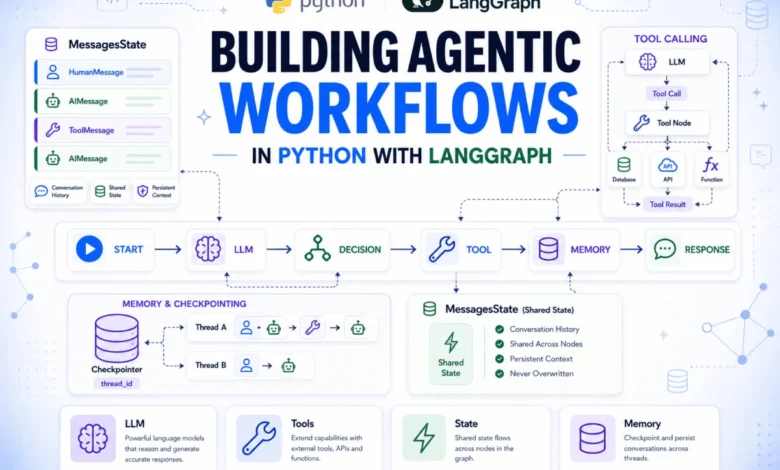
The landscape of artificial intelligence is rapidly evolving, moving beyond simple, single-turn interactions to sophisticated, multi-faceted agentic systems capable of complex reasoning, tool utilization, and persistent memory. While initial AI agent setups efficiently handle straightforward requests—taking a question, calling a model, and returning an answer—the true challenge arises when agents need to interact with external databases, retain context from previous conversations, or provide transparent insights into their decision-making processes. Many conventional implementations falter at this juncture, often requiring bespoke solutions that are difficult to scale and maintain.
The Evolution of AI Agents and the Need for Structure
The journey of AI agents has seen a remarkable progression, from early expert systems relying on predefined rules to the current generation of large language model (LLM)-powered entities. However, as the capabilities of LLMs expand, so too does the complexity of deploying them in real-world, dynamic environments. Developers frequently encounter hurdles in managing the intricate state of an agent, orchestrating sequences of actions, and ensuring continuity across conversational turns. The demand for AI systems that can operate autonomously, adapt to new information, and engage in extended, meaningful interactions has spurred the development of specialized frameworks.
LangGraph, an extension of the popular LangChain ecosystem, emerges as a pivotal solution to these challenges. It provides a clean, graph-based structure that elegantly handles the inherent complexities of advanced agentic workflows. By representing an agent as a graph, where nodes symbolize distinct units of work and edges define the flow of execution, LangGraph offers unparalleled visibility, inspectability, and extensibility. This architectural paradigm ensures that every reasoning step, tool invocation, and response contributes to a shared state object, encapsulating the complete message history and making the entire execution flow transparent to subsequent operations. This level of clarity is critical for debugging, auditing, and optimizing agent behavior, addressing a significant pain point for developers building sophisticated AI applications.
Setting the Foundation: Essential Setup for LangGraph Development
Embarking on LangGraph development requires a straightforward initial setup. To begin, developers must install the necessary Python packages. This typically involves langgraph itself, langchain-openai for seamless integration with OpenAI models, and python-dotenv for secure management of API keys. A standard pip install command suffices:
pip install langgraph langchain-openai python-dotenvFollowing the installation, it is crucial to configure API access securely. This is achieved by creating a .env file in the project’s root directory, containing the OpenAI API key:
OPENAI_API_KEY="your_key_here"To ensure that the application can access this key, python-dotenv is utilized at the outset of the script, loading environment variables before any LangChain or LangGraph imports:
from dotenv import load_dotenv
load_dotenv()
This practice promotes security by keeping sensitive credentials out of the codebase and facilitates easy configuration across different environments.
The Building Blocks: State, Nodes, and Edges
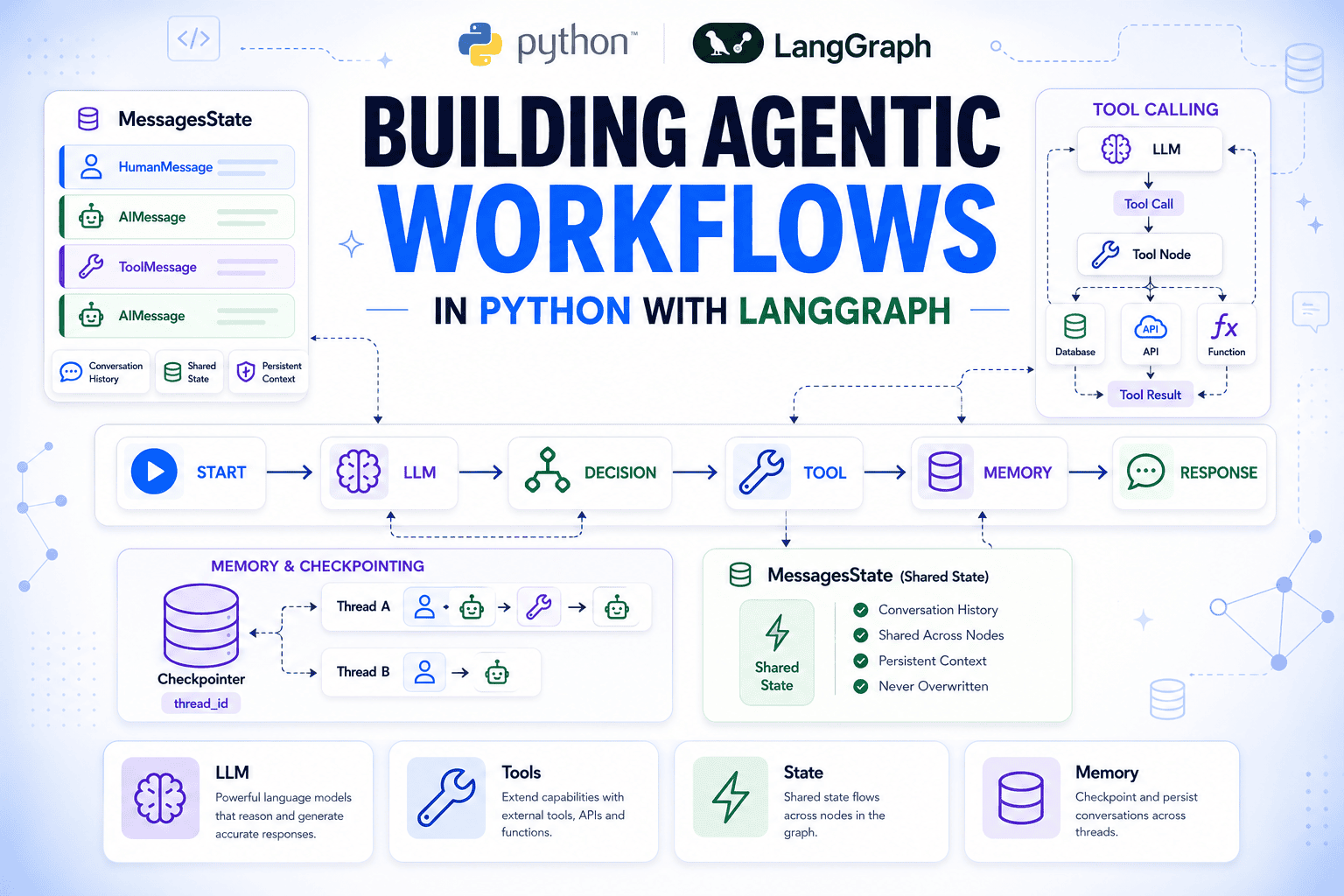
At the heart of every LangGraph application lie three fundamental components: State, Nodes, and Edges. Mastering these primitives is essential for constructing robust and scalable agentic workflows.
-
State: The State in LangGraph is defined as a
TypedDict, serving as the central, shared memory for the entire graph. Every node within the graph reads from and writes updates back to this shared state. This singular channel of communication simplifies data flow and ensures consistency. Critically, nodes only return the fields they intend to modify; any fields not explicitly updated remain unchanged, preserving the integrity of the overall state. This design paradigm, reminiscent of immutable data patterns, enhances predictability and reduces side effects. -
Nodes: Nodes are essentially plain Python functions. They accept the current graph state as an argument and return a dictionary containing the fields they wish to update in the state. The process of integrating a function into the graph is straightforward, requiring only registration with
StateGraph.add_node. LangGraph can automatically use the function’s name if a specific string name isn’t provided, streamlining development. This functional approach promotes modularity and reusability, allowing developers to encapsulate specific tasks or reasoning steps within discrete units. -
Edges: Edges dictate the execution order within the graph. A simple
add_edge(A, B)command establishes a direct sequential flow, meaning node B executes immediately after node A completes. For more dynamic control,add_conditional_edgesenables routing based on the output of a routing function. This function determines the next node to execute, introducing branching logic into the workflow. Every graph must define aSTARTentry point and at least one path leading toEND, ensuring a well-defined beginning and conclusion to the agent’s operation.
A crucial aspect of state management is the handling of accumulating data, such as logs or message histories. By default, a node’s return value for a state field replaces the existing value. However, LangGraph allows for the annotation of fields with a reducer function (e.g., operator.add for lists) to specify how updates should be merged rather than overwritten. This mechanism is vital for maintaining comprehensive historical data, as demonstrated by the following example, where both log_received and log_assigned nodes contribute to a cumulative log:
from typing import Annotated
import operator
from typing_extensions import TypedDict
from langgraph.graph import StateGraph, START, END

class TicketState(TypedDict):
    customer_message: str
    log: Annotated[list, operator.add]

def log_received(state: TicketState) -> dict:
    return "log": [f"Received: state['customer_message']"]

def log_assigned(state: TicketState) -> dict:
    return "log": ["Assigned to support queue"]

builder = StateGraph(TicketState)
builder.add_node("log_received", log_received)
builder.add_node("log_assigned", log_assigned)
builder.add_edge(START, "log_received")
builder.add_edge("log_received", "log_assigned")
builder.add_edge("log_assigned", END)

graph = builder.compile()
result = graph.invoke("customer_message": "My invoice looks wrong", "log": [])
print(result)
This execution yields:
'customer_message': 'My invoice looks wrong', 'log': ['Received: My invoice looks wrong', 'Assigned to support queue']
This output clearly illustrates how operator.add ensures that both log entries are preserved, while customer_message remains untouched as neither node returned it. This powerful reducer pattern is mirrored in MessagesState with its specialized add_messages reducer, which also handles deduplication and ordering, making it ideal for conversational agents.
Managing Conversational Context with MessagesState
For any conversational AI agent, maintaining a coherent and comprehensive history of interactions is paramount. Without it, the agent cannot understand context, recall previous statements, or engage in meaningful multi-turn dialogues. LangGraph addresses this critical requirement with MessagesState, a built-in TypedDict designed specifically for managing conversation history.
MessagesState includes a single messages field, which, crucially, uses the add_messages reducer. This means that every time a node returns new messages, they are intelligently appended to the existing list rather than simply overwriting it. This eliminates the need for developers to manually stitch together conversation history, significantly simplifying the development of stateful agents. The add_messages reducer is further optimized to handle deduplication and ordering of message objects, ensuring a clean and accurate record of the dialogue.
While MessagesState provides the core for conversational memory, it is fully extensible. Developers can easily add additional fields, such as customer_id, priority_flag, or any other context-specific data that their nodes might require. This flexibility allows for the creation of highly customized and context-aware agents tailored to specific application domains.
Integrating Language Models: The Core of Agentic Intelligence
The central intelligence of any LangGraph agent stems from its interaction with a language model. Within the graph, a dedicated node is responsible for invoking the LLM and incorporating its response into the shared state. This run_model node passes the accumulated message history to the LLM and appends the model’s AIMessage response back to the state’s messages field.
from langchain_openai import ChatOpenAI
from langchain_core.messages import SystemMessage, HumanMessage
from langgraph.graph import MessagesState

llm = ChatOpenAI(model="gpt-4o-mini")

def run_model(state: MessagesState) -> dict:
    system = SystemMessage("You are a support agent for a SaaS product. "
                           "Be concise and helpful.")
    response = llm.invoke([system] + state["messages"])
    return "messages": [response]
The ChatOpenAI wrapper from langchain_openai provides a standardized interface to the OpenAI API. This design choice offers significant flexibility, as swapping to a different LLM provider—be it Anthropic, Google, or a locally hosted model via Ollama—simply involves changing the import and the model string, leaving the core logic of the node intact. Furthermore, the use of SystemMessage allows for consistent role-setting for the model on every call without cluttering the persistent message history.
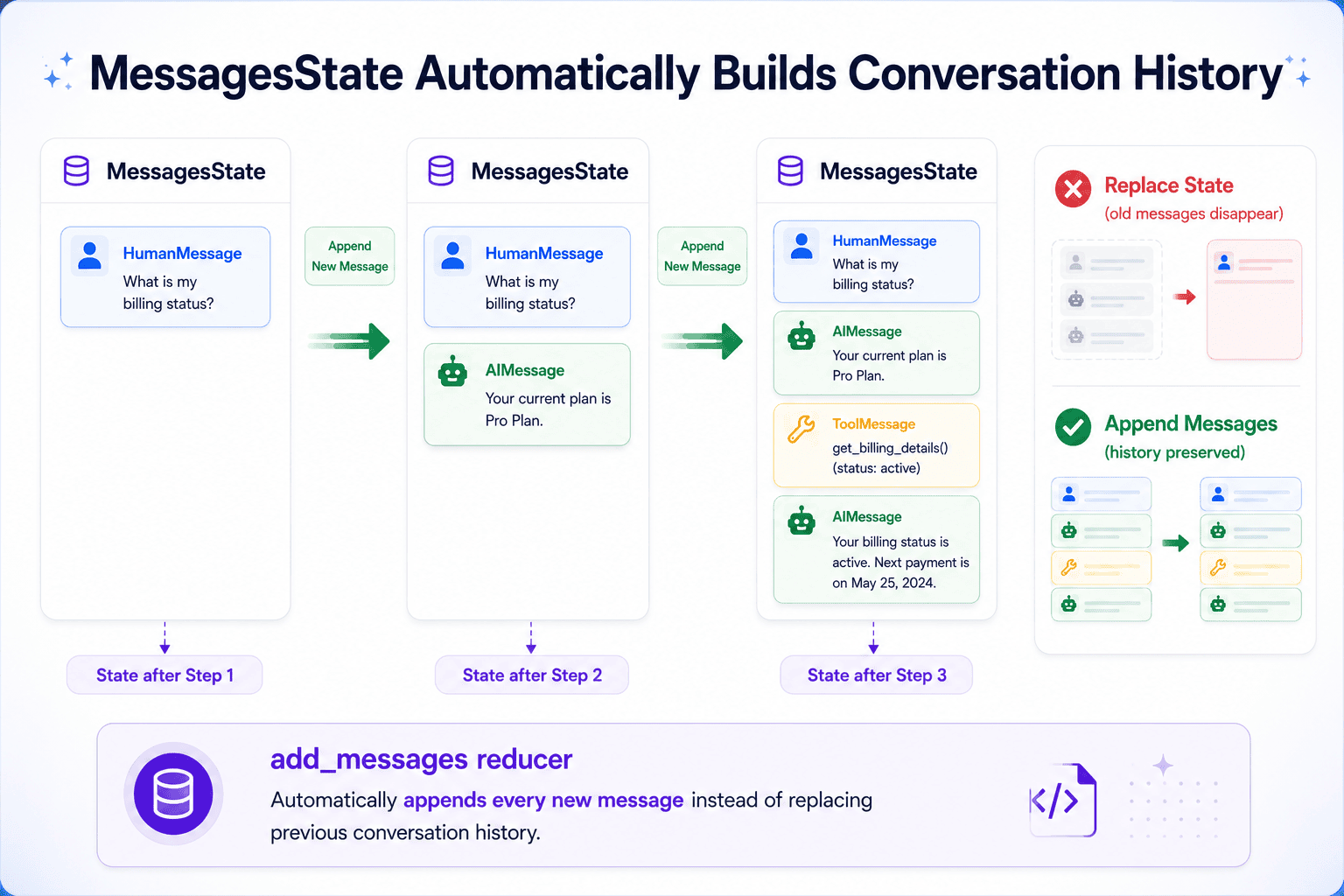
Integrating this run_model node into a basic graph creates a functional conversational agent:
from langgraph.graph import StateGraph, START, END

builder = StateGraph(MessagesState)
builder.add_node("run_model", run_model)
builder.add_edge(START, "run_model")
builder.add_edge("run_model", END)

graph = builder.compile()
result = graph.invoke("messages": [HumanMessage("My dashboard isn't loading. What should I try?")])
print(result["messages"][-1].content)
The result["messages"] will contain the complete conversation, including the initial HumanMessage and the AIMessage generated by the model, demonstrating the effective management of conversational flow.
Empowering Agents with Tools: Expanding Capabilities
While LLMs are powerful, their knowledge is often limited to their training data. To interact with real-world systems, retrieve specific information (like account details or subscription tiers), or perform actions beyond linguistic generation, AI agents require tools. LangGraph facilitates the integration of external tools, allowing agents to extend their capabilities significantly.
Tools are defined using the @tool decorator from langchain_core.tools. The docstring associated with the tool function is crucial, as it serves as the primary information source for the LLM when deciding whether to invoke the tool and what arguments to pass. Precision in docstrings is key to preventing missed calls or malformed arguments.
from langchain_core.tools import tool

@tool
def get_customer_tier(customer_id: str) -> str:
    """Look up the subscription tier for a customer by their ID.
    Returns 'free', 'pro', or 'enterprise'."""
    tiers =
        "cust_1001": "enterprise",
        "cust_2002": "pro",
        "cust_3003": "free",

    return tiers.get(customer_id, "not found")
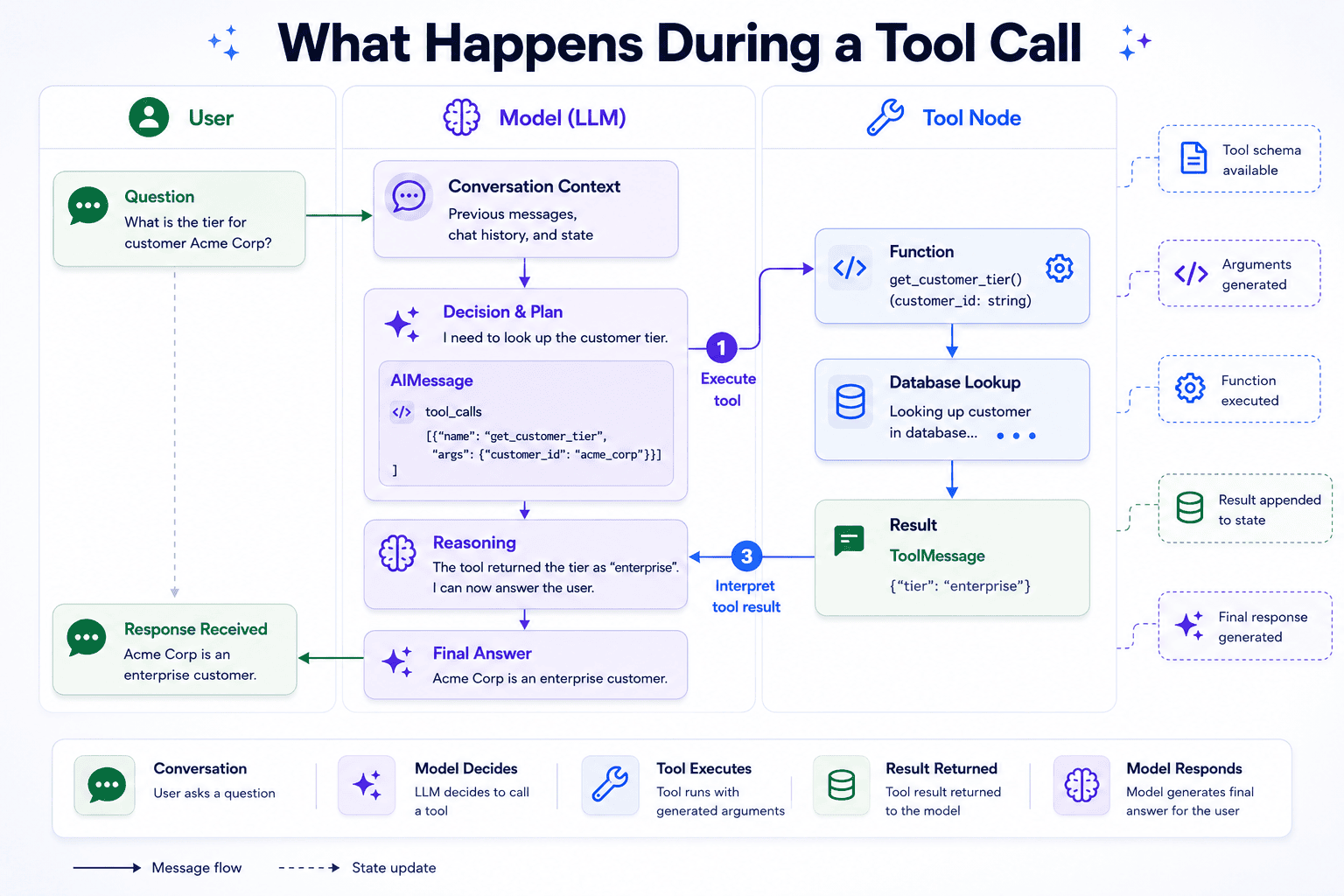
Once defined, tools are bound to the language model using llm.bind_tools(). This mechanism sends the tool’s schema to the model with every request, enabling the model to intelligently decide when and how to use it. When the model determines a tool call is necessary, its response will be an AIMessage with a tool_calls field populated, rather than just plain text content.
To execute these tool calls within the graph, LangGraph provides ToolNode. This prebuilt node reads the tool_calls from the last AIMessage, executes the corresponding function with the specified arguments, and appends the result as a ToolMessage to the state. Routing logic is handled by tools_condition, which checks if tool_calls is present in the last AIMessage. If so, it routes to the "tools" node; otherwise, it directs the flow to the __end__ of the graph. The edge from "tools" back to "run_model" creates a crucial loop, allowing the tool’s output to be fed back to the model for interpretation and generation of a final, informed answer.
from langgraph.prebuilt import ToolNode, tools_condition

tools = [get_customer_tier]
llm_with_tools = llm.bind_tools(tools)

def run_model(state: MessagesState) -> dict:
    system = SystemMessage("You are a support agent for a SaaS product. "
                           "Use available tools when you need account-specific information.")
    response = llm_with_tools.invoke([system] + state["messages"])
    return "messages": [response]

tool_node = ToolNode(tools)

builder = StateGraph(MessagesState)
builder.add_node("run_model", run_model)
builder.add_node("tools", tool_node)
builder.add_edge(START, "run_model")
builder.add_conditional_edges("run_model", tools_condition)
builder.add_edge("tools", "run_model")
graph = builder.compile()
Tracing the Reasoning Loop: The ReAct Pattern in Action
Understanding the internal workings of an agent, particularly when tools are involved, is vital for debugging and optimization. When a model uses a tool, a specific interaction pattern known as ReAct (Reasoning and Acting) unfolds within the graph. This pattern involves a sequence of model calls and tool executions, each contributing to the agent’s overall reasoning process.
Consider an invocation asking for a customer’s plan:
result = graph.invoke("messages": [HumanMessage("Can you check what plan customer cust_1001 is on?")])
for msg in result["messages"]:
    print(type(msg).__name__, ":", msg.content or msg.tool_calls)
The output reveals the ReAct pattern:
HumanMessage : Can you check what plan customer cust_1001 is on?
AIMessage : ['name': 'get_customer_tier', 'args': 'customer_id': 'cust_1001', 'id': 'call_Rx7kLmNpQ2wJtA3s', 'type': 'tool_call']
ToolMessage : enterprise
AIMessage : Customer cust_1001 is on the enterprise plan.
This trace shows four messages and two distinct model calls. The first AIMessage signals the model’s intention to use a tool, with its tool_calls field populated and content empty. The tools_condition routes this to ToolNode, which executes get_customer_tier("cust_1001") and appends a ToolMessage containing the result. The graph then loops back to run_model. In this second model call, the LLM, now having the ToolMessage in context, interprets the successful lookup and generates the final AIMessage with the answer. The tools_condition then finds no further tool calls and terminates the graph. This transparent, step-by-step execution highlights that each tool use typically incurs two model calls—one for decision-making and one for interpretation—a crucial insight for managing latency and operational costs in production environments.
Persisting Conversations: Enabling Long-Term Memory
A key requirement for any practical conversational agent is the ability to remember previous exchanges and maintain context across separate invocations. Without persistence, each graph.invoke() call starts with a blank slate, leading to disjointed and frustrating user experiences. LangGraph addresses this with checkpointers.
By attaching a checkpointer when compiling the graph, developers can ensure that the agent’s state is saved and restored automatically.
from langgraph.checkpoint.memory import InMemorySaver

checkpointer = InMemorySaver()
graph = builder.compile(checkpointer=checkpointer)
To leverage this persistence, a consistent thread_id is passed with each invocation. This thread_id acts as a unique identifier for a particular conversation, allowing the checkpointer to load and save the correct state.
config = "configurable": "thread_id": "ticket-7741"
graph.invoke(
    "messages": [HumanMessage("Hi, I can't access my account.")],
    config,
)
result = graph.invoke(
    "messages": [HumanMessage("My ID is cust_2002, can you check my plan?")],
    config,
)
print(result["messages"][-1].content)
The sample output demonstrates the agent’s memory:
You're on the pro plan, cust_2002. Since you're having trouble accessing your account, I'd recommend resetting your password first. Pro accounts also have priority support available if the issue continues.
The agent successfully recalled the initial problem ("I can’t access my account") and integrated it with the new information ("cust_2002" and "pro plan") to provide a comprehensive and contextually relevant response.
While InMemorySaver is excellent for development and testing, production environments typically require a persistent checkpointer backed by a robust database (e.g., PostgreSQL, Redis) or other durable storage solutions. The beauty of LangGraph’s design is that switching to a different checkpointer requires minimal code changes, primarily at the compile stage, leaving the core graph logic unaffected.
Beyond conversational persistence, applications may also need to store data independently of any specific conversation, such as user profiles or long-term memories shared across multiple threads. For this, LangGraph offers Stores, which complement checkpointers by providing durable, application-level storage that graphs can access during execution. This clear distinction between conversational state (checkpointers) and application data (stores) offers greater flexibility and architectural clarity.
Broader Impact and Future Implications
LangGraph’s structured approach to building agentic workflows represents a significant leap forward in AI development. Its emphasis on clear state management, modular nodes, and explicit execution paths addresses many of the challenges inherent in creating complex, autonomous AI systems. The graph-based paradigm enhances transparency and debuggability, allowing developers to trace the agent’s reasoning process step-by-step, which is invaluable for performance optimization, error identification, and ensuring responsible AI deployment.
The framework’s ability to seamlessly integrate tools and manage persistent conversation history paves the way for increasingly sophisticated applications across various industries. From hyper-personalized customer support agents capable of deep context recall and dynamic problem-solving, to intelligent assistants for healthcare, finance, or education that can access and process vast amounts of external information, the potential is immense. The architecture also naturally scales to multi-agent systems, where a "coordinator" agent can route requests to specialized "expert" agents, each with its own tools and knowledge domains, fostering highly collaborative and capable AI ecosystems.
Industry experts widely recognize that frameworks like LangGraph are crucial for unlocking the next generation of AI capabilities. By providing a predictable and extensible foundation, LangGraph empowers developers to move beyond basic chatbots and construct truly intelligent, adaptable, and autonomous agents that can tackle real-world problems with unprecedented efficacy and clarity. As the demand for sophisticated AI continues to grow, LangGraph stands as a testament to the power of structured design in building the future of artificial intelligence.