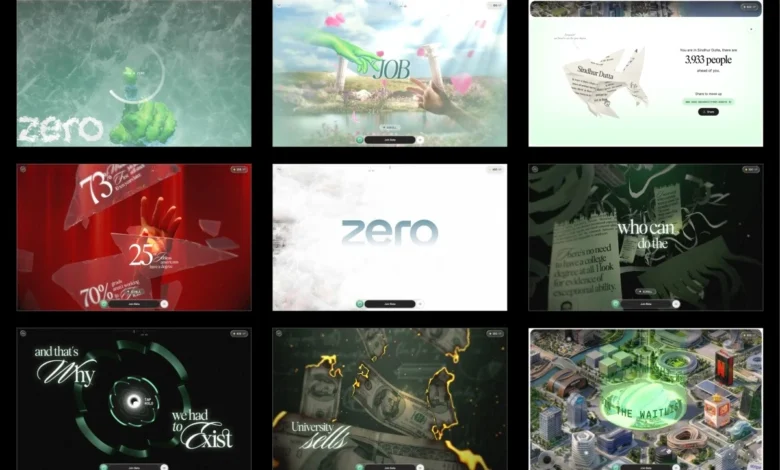
The digital landscape is constantly evolving, with creators pushing the boundaries of what’s possible on the web. A recent standout example of this innovation is "ZERO," an interactive narrative demo that captivates users from the very first moment. Instead of a conventional "enter" button, visitors are greeted with a simple yet profound instruction: draw a zero. This unique interaction, where a drawn circle triggers a cascade of visual effects and unveils an immersive experience, has garnered significant attention for its technical prowess and engaging design.
At its core, ZERO is more than just a visually stunning demonstration; it’s a testament to meticulous engineering and creative problem-solving. The project, developed over four months, transforms over a gigabyte of source assets into a remarkably lightweight web experience, weighing in at under 10MB and maintaining a smooth 60 frames per second even on less powerful mobile devices. This achievement is the result of sophisticated 3D pipeline management, innovative tooling, advanced shader programming, and rigorous performance optimization.
The genesis of ZERO can be traced back to a compelling proof of concept presented by Atul Khola’s team. Rather than a traditional presentation, they opted for a tangible demonstration, building the now-iconic "draw a zero" interaction within a mere 48 hours. This rapid prototyping, significantly aided by artificial intelligence, allowed them to quickly iterate on ideas and refine the visual effects, particularly the mesmerizing frost spread that gradually reveals the experience. This initial success was instrumental in securing the project.
The integration of AI into the development workflow marked a significant shift. Instead of investing substantial time in building the initial versions of concepts, the team could leverage AI to generate them rapidly. This freed up valuable development cycles for crucial tasks such as testing, refining, and iterating on core elements. This agile approach enabled them to explore multiple variations of effects, including burning money animations, glass shattering sequences, and various shader concepts, before converging on the most impactful implementations. The initial coding became a less time-consuming aspect, with the real challenge lying in evaluating outcomes, enhancing details, and ensuring every interaction felt polished and purposeful.
A Narrative Unfolding: Six Stages and Five Gates
The ZERO experience is meticulously structured into six distinct narrative stages, punctuated by five interactive "gates." These gates serve as crucial pivot points, either pausing the narrative flow or actively redirecting the user’s journey. Examples of these gates include the initial zero-drawing mechanism, a "hold to shatter" interaction, and a "hold to launch" sequence.
The narrative itself follows a clear arc, beginning with the familiar promise of a traditional academic path: diligent study, academic achievement, and eventual employment at a prestigious corporation. The first gate shatters this illusion quite literally. Upon crossing this threshold, users are confronted with stark unemployment statistics displayed amidst fragmented glass. The third stage further deconstructs the value of a conventional degree, depicting money burning and certificates being shredded, before transitioning into a tunnel shaped like the ZERO logo. Emerging from this tunnel, stage four reveals a cityscape constructed from the actual headquarters of prominent companies. The experience culminates in stage five, where users are granted full control over an interactive city map, allowing for free exploration.
Architectural Foundation: A Singular Scroll Value
A pivotal architectural decision in the development of ZERO was the complete avoidance of the browser’s native scrolling mechanism. This deliberate choice meant foregoing tools like ScrollTrigger and large, scrollable DOM elements. Instead, user input from wheel and touch gestures is used to update a single, virtual scroll value. This value then smoothly interpolates towards its intended target. Every other element of the experience – including asset loading, animations, shader timing, text rendering, and on-screen overlays – is directly driven by this unified scroll value.

Each stage of the project is designed as a self-contained segment, complete with optional lifecycle methods. This modular approach is represented by a structure that defines parameters such as scrollVh (the virtual scroll distance the segment occupies) and functions for enter (building Three.js objects), scrub (handling local progress within the segment), update (executing frame-by-frame logic), and teardown (disposing of assets and handing off to the next segment).
In practice, the project is divided into nine such segments, with the initial loading screen also functioning as the first interactive gate. This self-contained segment design significantly enhanced code maintainability, especially during later stages of development, and streamlined the debugging process. Critically, navigating to any specific stage would replay the lifecycle of all preceding segments, ensuring a consistent and natural initialization of the experience, rather than a jarring teleportation.
Optimizing 3D Assets for the Web
A substantial portion of the four-month development cycle was dedicated to preparing the 3D assets for web deployment. The original source files were production-ready Blender scenes, featuring uncompressed geometry, 8K textures, baked animations, and exceeding a gigabyte in size. The initial phase involved carefully evaluating the optimal format for each asset.
Geometry is delivered using DRACO compression, with self-hosted decoders integrated into the project. Both the Draco and KTX2/Basis transcoders are bundled within the public/vendor/ directory, rather than being loaded from external CDNs. This decision was a direct result of a past experience where slowdowns on critical CDN services like gstatic and unpkg caused compressed asset decoding failures, even though the assets themselves were locally hosted. The realization was stark: if your decoder resides on a third-party server, your entire asset pipeline becomes vulnerable to external dependencies.
Textures presented the most significant challenge and opportunity for performance gains. While PNG files might appear small on disk, they are fully decompressed in GPU memory. A 2048² texture, regardless of its file size, can occupy approximately 16MB of VRAM. KTX2 with ETC1S compression, however, maintains its compressed state on the GPU, drastically reducing memory usage and accelerating upload times.
The Compression Previewer: A Crucial Internal Tool
A notable hurdle with KTX2 is the absence of a straightforward local preview mechanism. Given that ETC1S is a lossy compression format, achieving optimal compression settings often involves a time-consuming trial-and-error process. A single global setting could either lead to wasted memory or unacceptably degrade textures that require higher fidelity.
To address this, the development team implemented a custom converter and previewer within their internal dashboard. This tool provides a side-by-side comparison of compressed and uncompressed images and videos, facilitating an accurate assessment of compression results. This allowed for fine-tuning of ETC1S settings on an asset-by-asset basis, applying more aggressive compression where visual impact was minimal, preserving quality for critical assets, and selectively disabling mipmaps when they were not essential. This seemingly simple tool proved to be instrumental in optimizing the final build, representing a crucial step often overlooked in WebGL workflows.
The principle of asset consolidation was applied universally. Related textures, such as all hand textures, were packed into a single 4×4 atlas. Each mesh then utilizes UV offsets and scaling to reference its specific section within the atlas. This approach was extended to other elements, with text sprites consolidated from four separate atlases into one, followed by similar optimizations for certificates, paper shreds, clouds, coins, and glass shards. Over fifty individual images were streamlined into approximately a dozen atlases, while many gradient backgrounds were replaced with concise GLSL code. The initial builds, around 35 to 40MB, were successfully reduced to under 10MB for the final release. The interactive world map was further isolated into its own loading group, ensuring it did not impede the initial loading experience.

Mitigating Texture Upload Stutters
While reducing download size is paramount, the process of uploading compressed textures to the GPU on the main thread can introduce noticeable performance hitches. A large texture upload can easily block rendering for 50 milliseconds, leading to frame drops. If such an upload occurs precisely when a texture is first needed during scrolling, the resulting stutter is immediately apparent, compromising the perceived smoothness of the site, even if benchmarks are strong.
To combat this, texture uploads were managed through a three-pronged strategy. Firstly, texture uploads were intelligently queued and executed during idle periods using requestIdleCallback. This function ensures that uploads only proceed when the browser has spare processing time, preventing them from interfering with critical rendering tasks. The provided code snippet illustrates this, with drainUploads efficiently processing the uploadQueue as long as deadline.timeRemaining() allows.
Secondly, the team implemented pre-warming for essential textures. This involves uploading textures to the GPU during less critical moments, such as during the initial loading phase or between stage transitions. This ensures that by the time a texture is required for rendering, it is already on the GPU, eliminating any potential upload delays.
Thirdly, when the system anticipates the need for new textures, such as during stage transitions or after the loader completes, the upload queue is flushed synchronously. This proactive approach guarantees that all necessary textures are already on the GPU before they are needed for on-screen rendering, thereby preventing any first-time upload hiccups during scrolling.
The Adaptive Quality Manager: Dynamic Visual Adjustments
Recognizing the inherent unpredictability of user devices, the ZERO renderer continuously monitors its own performance. It tracks frame times using a rolling buffer and dynamically adjusts visual quality. If rendering performance dips below a threshold, the system automatically downgrades to a lower quality tier. Conversely, if performance improves and remains stable, it scales back up. A built-in cooldown mechanism prevents constant oscillations between quality levels. The provided code snippet demonstrates this logic: if the average frame time exceeds 22ms (indicating sub-45fps performance) and the current tier is not already the lowest, the system will downgrade. Similarly, if the average frame time drops below 12ms (indicating over-83fps performance) and the tier is not the highest, it will upgrade.
These quality tiers are designed to affect visual polish rather than the core user experience. They adjust parameters such as pixel ratio, blur sample count, coin geometry detail, and text resolution. This ensures that the narrative remains consistent and engaging across a wide spectrum of devices, from high-end flagships to budget-friendly phones. Furthermore, targeted optimizations are employed. For instance, during the glass shattering interaction, the renderer temporarily reduces the pixel ratio and disables blur and frost effects, effectively masking any performance cost within the gesture itself. A significant portion of the final development month was dedicated to profiling and optimizing the experience on a budget Android device, meticulously identifying and resolving frame rate spikes. The most significant offender identified was a single, prolonged 157ms frame.
Shader Craftsmanship: The Visual Backbone
The visual richness of ZERO is heavily reliant on its sophisticated shader implementation. The post-processing chain is a key component, with each frame built through a series of sequential passes. These include the core renderPass for the 3D scene, a bgPass for procedural backgrounds, the frostingPass for the draw-zero frost and melt effect, a tier-gated lensBlurPass for depth-of-field, and a final fgPass incorporating grain and tone mapping.

Certain passes, such as textPass, glassPass, and shatterPass, are initialized lazily and warmed up during idle periods. This strategy ensures they do not contribute to the loader’s critical path. The provided code snippet illustrates how these passes are added, inserted, and pre-warmed. For example, glassPass and shatterPass are pre-warmed to ensure their initial frames are rendered from cache rather than incurring shader compilation stalls. The textPass is conditionally enabled, running only when there are visible sprites.
Each significant moment in the experience features a custom shader tailored for its specific effect. While AI assisted in generating initial shader versions, every shader underwent rigorous refinement and rework before integration into the final product.
The Frost Unlock Shader
The frost effect is achieved using a ping-pong buffer technique with four distinct passes: horizontal, vertical, and two diagonal passes. Each pass expands the drawn stroke by propagating the brightest neighboring pixels, resulting in an octagonal growth pattern. This expansion is modulated by the brightness of a frost texture, lending a more natural, crystalline quality to the edges. Once the stroke is complete, its centroid serves as the origin for a radial melt effect. The provided GLSL code snippet demonstrates one of the axis passes, highlighting the stepped expansion modulated by frost luminance.
Illuminating Hands Without Lights
Implementing real-time lighting on skinned meshes would have been prohibitively expensive. The requirement for lighting to precisely match the original artwork necessitated an alternative approach. Lighting was baked directly into textures, and blending between these textures creates the illusion of dynamic lighting. Two texture slots are employed; the incoming slot is updated for each keyframe, and a smooth crossfade between them generates the lighting transition. The code snippet shows the premultiplication of alpha before blending to prevent dark halos around transparent edges. Both lighting textures are stored within a single atlas, meaning that switching between them involves only updating two UV offsets and a blend factor.
The Burning Money Effect
The visually striking burning money effect utilizes a noise-driven distance field to progressively dissolve each banknote. Just before the burn reaches a particular area, a thin, glowing HDR ember rim appears, followed by the charred surface. The GLSL code demonstrates how a threshold based on burn progress controls the dissolution, with early discarding of fragments that haven’t reached the burn threshold to optimize performance. The FBM (Fractional Brownian Motion) calculation, being the most computationally intensive part of the shader, is subject to early exit conditions.
Shredding Certificates: Dynamic Geometry
In the certificate shredding sequence, each vertex stores a strip index, dictating which individual shred it belongs to. As a shred front progresses from left to right, each strip detaches from the main sheet and falls independently with its own rotation, creating the effect of the certificate tearing into ribbons. The provided GLSL code illustrates how a "past" variable, derived from the shred progress and vertex position, drives the strip’s gravity-induced fall and independent tumble. Crucially, lighting normals are generated analytically from the same wave function that governs the animation, eliminating the need for a normal map.

The Tunnel Effect
The tunnel effect is generated by extruding the cross-section of the ZERO logo. A brightness pulse travels through the tunnel, synchronized with the geometry’s world-space Z coordinate. This ensures the effect remains seamless, even as sections of the tunnel repeat. The GLSL code shows how a "fract" function, combined with pulse frequency and time, creates a repeating band of light that gains intensity based on uPulseGain.
Focusing Text: A Gradual Reveal
The narrative text employs a seven-tap hexagonal blur, consisting of a central sample and six surrounding samples. The blur radius is dynamically controlled by the reveal progress, allowing the text to gradually sharpen into focus as it enters the viewport, rather than appearing abruptly. This effect runs as part of the deferred text pass, meaning the blur is entirely skipped when no text is visible, thus avoiding unnecessary rendering costs. A significant debugging challenge involved shader precision; several shaders required explicit highp float declarations to function correctly on mobile GPUs like Adreno and Mali, which treat mediump as a true 16-bit float. This oversight led to subtle bugs, such as identical movement of certificate strips or banding in the burn effect, which were absent on desktop hardware. This underscores the importance of early and continuous testing on actual mobile devices.
Interaction Design: Engaging the User
The source material for ZERO comprised images and videos rather than explicit interaction specifications, necessitating the design of each gate’s behavior from the ground up. The majority of these gates utilize a configurable "press and hold" system. A shared configuration defines the prompt’s appearance and the required hold duration, while each gate implements its unique visuals through a set of defined hooks. The code snippet illustrates this structure, with showAt, holdDuration, onHoldProgress, and onHoldComplete parameters.
During the hold interaction, the entire frame gradually shifts towards a dark red hue. Upon glass shattering, this color instantly snaps back, typically within 200 milliseconds. This rapid transition creates a palpable sense of the shards breaking away the darkness, a stark contrast to a longer 400ms transition, which was found to be less impactful. The shatter sound effect is also meticulously synchronized with the first rendered frame rather than a timer. This approach mitigates the risk of audio playback preceding the visual animation on slower devices, ensuring a cohesive and synchronized experience.
The Grand Finale: An Interactive World
The concluding launch sequence propels the user into an open sky. As stage four progresses, clouds dissipate to reveal the city below, with the ZERO tower prominently positioned at its center. A halo emerges above the tower, marking the final gate, before the camera settles into the interactive map.
Stage five shifts control entirely to the user. Users can pan, zoom, and explore the city at their leisure. Each marker on the map reveals a card detailing roles, scenarios, and tools, complete with a "Join Beta" button. The persistent join bar also serves as the waitlist signup mechanism. After guiding the user through the narrative, the experience concludes by empowering them to freely explore its intricate world.

Concluding Reflections: Engineering for Excellence
One of the most profound lessons learned from the ZERO project was the critical importance of asset preparation and GPU upload management, which demand as much attention as the rendering process itself. Tools such as the compression previewer, self-hosted decoders, the upload queue, and the adaptive quality manager, while perhaps not the most glamorous aspects of the development pipeline, were instrumental in transforming over a gigabyte of source assets into a sub-10MB experience that performs smoothly even on budget mobile phones.
Regarding the role of AI, it effectively served its purpose by accelerating the generation of initial code versions, including the pivotal prototype that secured the project. The true labor, however, lay in the subsequent stages: refining interactions, enhancing visual fidelity, meticulously profiling performance, and making countless nuanced decisions that only become apparent through real-device testing. While AI can expedite code generation, the creation of a polished interactive experience remains fundamentally dependent on diligent iteration and astute engineering judgment.
Credits
The successful realization of ZERO is a testament to the collaborative efforts of a dedicated team. Key contributors included Atul Khola, whose vision and leadership were central to the project’s inception and execution. The engineering and design efforts were spearheaded by a talented group, each bringing unique expertise to the table. The project’s visual artistry and technical implementation were a combined effort, highlighting the synergy between creative direction and advanced web development practices.