The relentless march of technological advancement often inundates us with promises of revolutionary new tools, each heralded as a paradigm shift. We are frequently presented with shiny, "smart" workflows, complex command-line interfaces, and the often-frustrating dance of switching between myriad applications. Yet, in the practical landscape of daily life and professional endeavors, the average user does not require an ever-expanding arsenal of discrete software. What is truly needed, and demonstrably more impactful, are seamlessly integrated capabilities that elegantly align with and enhance our pre-existing cognitive frameworks and established mental models. This fundamental user requirement is underscored by the growing emphasis on intuitive design and the strategic deployment of AI, as highlighted by resources like "Design Patterns For AI Interfaces," a comprehensive video course by Vitaly that delves into the UX and design patterns crucial for effective AI integration.
The current digital ecosystem, while offering a vast array of functionalities, frequently falls short in its ability to present these capabilities in a cohesive and accessible manner. Users are not inherently motivated by the novelty of a new "smart" workflow if it demands a steep learning curve or requires them to navigate unfamiliar interfaces. Similarly, the prospect of deciphering complex terminal commands or engaging in repetitive, context-switching chat interactions to achieve a desired outcome is generally met with weariness rather than enthusiasm. Instead, the genuine demand lies in the provision of robust and reliable integrations of valuable features that directly address problems characterized by high severity, high frequency, and a significant degree of user frustration.
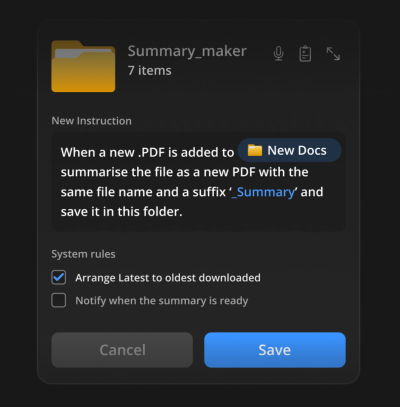
This principle is exemplified by innovative approaches to file management and AI interaction. Consider the concept of "folder instructions," a mechanism that allows users to define the purpose and operational logic of a folder. This is not as abstract as it might initially sound. Instead of manually organizing files, renaming documents, or categorizing information within a folder, users can establish a set of rules and intents for that specific folder. For instance, a folder designated for "Passport Applications" could be configured to automatically sort incoming documents, extract relevant information from forms, and even flag incomplete submissions, all without requiring explicit, step-by-step user intervention for each file. This represents a profound shift from reactive file management to proactive, intent-driven organization, driven by AI capabilities embedded directly within the user’s familiar file system.

The underlying philosophy driving this user-centric approach is the contrast between "AI-first" and "Quiet AI" paradigms. The "AI-first" product development strategy, while potentially accelerating initial development cycles, often overlooks the decades of meticulous design decisions that have shaped user expectations and established mental models. These ingrained patterns of interaction, from the simple act of clicking a button to the complex navigation of software suites, are deeply embedded in user cognition. Introducing entirely new paradigms without carefully bridging this gap can lead to friction and resistance, regardless of the AI’s underlying power.
In contrast, "Quiet AI" represents a more subtle yet profoundly effective integration strategy. These AI-powered tools operate largely in the background, performing specific tasks on behalf of the user without demanding constant attention. They are designed to be unobtrusive, assisting with repetitive, tedious, or error-prone tasks that can be effectively automated or augmented by intelligent assistance. A prime example of this approach is the integration of AI assistants like Claude within widely used productivity suites such as Microsoft Excel, PowerPoint, and Word. When Claude is integrated into Excel, for instance, users can perform complex data analysis, generate insights from specific rows or columns, or even draft formulas directly within the spreadsheet interface. This eliminates the need to switch to a separate AI chatbot, copy and paste data, and then re-enter the information, thereby preserving workflow continuity and reducing cognitive load. This seamless embedding of AI capabilities directly into the tools users already employ significantly enhances efficiency and reduces the likelihood of errors, directly addressing the core user need for streamlined task completion.

The concept of "folder instructions" aligns perfectly with the "Quiet AI" ethos. By defining the intended function and behavior of a folder, users empower the system to automate a range of tasks. These instructions can dictate how files are organized, how sub-folders should be structured, and what actions should be automatically performed upon file ingestion or modification. For example, a folder set up for "Project X Deliverables" could be instructed to automatically rename files based on a predefined naming convention, categorize them by deliverable type (e.g., reports, presentations, code snippets), and even initiate a summarization process for any uploaded PDF documents. This allows users to set their intent once and then let the system diligently execute those instructions, freeing up valuable time and cognitive resources.
Furthermore, the inherent design of such integrated AI features emphasizes local scoping of permissions and actions. Unless explicitly extended by the user, these intelligent operations remain confined to the specific folder on the user’s machine. This approach respects user privacy and control, ensuring that AI assistance is applied judiciously and within the boundaries defined by the user. This granular control is a critical component of building trust and fostering adoption of AI-powered features, as users feel empowered rather than subject to the unknown operations of an external system.

The implications of this shift towards seamless integration are far-reaching. In an era where data volume is exploding and the complexity of information management is escalating, the ability to delegate routine tasks to intelligent systems embedded within familiar environments is paramount. This approach not only boosts individual productivity but also has the potential to significantly reduce errors and improve the overall quality of work. When users are not bogged down by manual, repetitive processes, they are better positioned to focus on higher-level strategic thinking, problem-solving, and creative endeavors. The frustration and slowdowns often associated with context-switching and manual data manipulation are minimized, leading to a more positive and productive user experience.
The historical context of software development reveals a recurring pattern: the introduction of standalone applications that require significant user effort to integrate into existing workflows. While these tools may offer specialized functionalities, their utility is often hampered by the friction they introduce. The current wave of AI innovation presents an opportunity to break this cycle. Instead of launching yet another standalone AI application, the focus should be on embedding AI-powered assistance into the fabric of existing tools and platforms. This approach aligns with how users naturally interact with technology, leveraging established mental models and minimizing the cognitive overhead associated with learning and managing new software.
The value proposition for users, therefore, is not about having more tools, but about having tools that work better together. It’s about reducing the friction points in their daily digital lives. This is achieved by intelligently automating mundane tasks, providing context-aware assistance, and ensuring that powerful capabilities are accessible when and where they are needed, without disruption. The success of AI in the professional sphere hinges on its ability to become an invisible, yet indispensable, partner in the user’s workflow.
The ongoing evolution of user interface design and the strategic integration of AI are critical areas of focus for product developers and designers. Initiatives like "Design Patterns For AI Interfaces" by Vitaly aim to provide practical guidance and real-world examples to help create AI features that are not only powerful but also intuitive and user-friendly. Such resources underscore the importance of understanding user behavior, cognitive psychology, and established design principles when developing AI-powered applications. By prioritizing seamless integration and respecting existing mental models, developers can create AI solutions that genuinely empower users and enhance their productivity without adding to the burden of digital complexity.

In conclusion, the pursuit of more tools in our daily lives is often a misdirection. The true measure of technological progress lies in its ability to simplify, streamline, and enhance our existing capabilities. Seamless integration of useful AI features, designed to complement and augment our established mental models, represents the most impactful path forward. This approach not only addresses user frustrations but also unlocks new levels of productivity and innovation, ensuring that technology serves as a genuine enabler rather than an additional burden.