The web development landscape continues its rapid evolution, with May 2026 marking a significant month for new features and enhancements landing in stable and beta browser releases. Developers can now leverage a host of powerful new capabilities across Chrome, Firefox, and Safari, streamlining workflows, improving user experiences, and pushing the boundaries of interactive web design. This comprehensive overview details the key advancements, offering context and analysis of their potential impact.
Stable Browser Releases: A Foundation for Innovation
May 2026 saw the stable release of major browser versions, including Chrome 148, Firefox 151, and Safari 26.5. These updates introduce several foundational features that are now widely available to users, empowering developers to implement cutting-edge functionality with confidence.
The :open CSS Pseudo-class Becomes Baseline
Safari 26.5, while primarily focused on stability and bug fixes, has brought the :open CSS pseudo-class to baseline status. This advancement provides a more semantic and elegant way to style elements that exhibit distinct "open" and "closed" states. Previously, developers often resorted to attribute selectors like details[open] to achieve similar styling, which could be less intuitive and more verbose.
The :open pseudo-class now directly targets elements such as <details> and <dialog> when they are in their expanded state. Crucially, it also extends its reach to interactive elements like <select> dropdowns and <input> elements that present picker interfaces, such as color choosers or date pickers, when these interfaces are active. This unification of styling capabilities simplifies the development process and promotes cleaner, more maintainable CSS. The standardization of this pseudo-class means developers can rely on consistent behavior across browsers without the need for workarounds.
CSS Name-Only Container Queries Achieve Baseline Status
A significant milestone in responsive design arrived with Chrome 148’s stable release, which now makes name-only container queries a baseline feature. Container queries, introduced to provide more granular control over component styling based on the dimensions of their parent containers, have been further refined. Previously, implementing a container query required specifying a size or style condition alongside the container name and explicitly defining the container’s type using the container-type property.
The new name-only container queries simplify this process considerably. Developers can now query the presence of a named container solely by its name, eliminating the need for additional conditions. This is particularly useful for scenarios where a component needs to adapt its styling based on whether it’s placed within a specific contextual container, regardless of that container’s exact dimensions. Furthermore, the requirement to set container-type on an ancestor element when only querying by name has been removed. This streamlines the setup for component-based styling and reduces boilerplate code.
The syntax for this simplified approach is illustrated as follows:
#container
  container-name: --sidebar;


@container --sidebar
  .content
    padding: 2rem;
This change is expected to accelerate the adoption of container queries, making it easier for developers to build truly modular and adaptable web components that respond intelligently to their layout context.
Container Style Queries for Custom Properties Reach Baseline Status
Further enhancing the power of container queries, Firefox 151 has introduced support for style() queries within @container. This development makes container style queries for custom properties a baseline feature, offering a new dimension of conditional styling.
While size queries are invaluable for adapting layouts to available space, style queries allow developers to react to non-size-related features of a parent container. The full cross-browser support for querying custom properties is a particularly noteworthy advancement. This means developers can now reliably check the state or value of CSS custom properties on a parent container and apply styles accordingly.
For instance, a common use case would be to dynamically style a card component based on a theme setting applied to its ancestor. The example below demonstrates how to apply distinct styling to a .card element if its parent container has the --theme custom property set to dark:
@container style(--theme: dark)
  .card
    background-color: #1a1a1a;
    color: #fff;
This capability unlocks sophisticated theming mechanisms, adaptive UI elements based on user preferences stored in custom properties, and more dynamic component behaviors without relying on JavaScript for every conditional change. The implications for design systems and accessible design are substantial, allowing for more robust and maintainable theming solutions.
Lazy Loading for Video and Audio Elements
Chrome 148 has extended native lazy loading capabilities to <video> and <audio> elements. Mirroring the functionality already available for <img> and <iframe> elements, developers can now use the loading="lazy" attribute to instruct the browser to defer the loading of media resources until they are in or near the viewport.
This enhancement is a critical step towards improving web performance, particularly for pages rich in multimedia content. By delaying the download of video and audio files until they are likely to be viewed, browsers can significantly reduce initial page load times, conserve bandwidth for users, and decrease data consumption. This is especially impactful for users on metered connections or with limited mobile data plans.
The implementation team highlighted the importance of this feature in a recent publication, stating, "Empowering developers with native lazy loading for all media types is a fundamental step in building faster, more efficient web experiences. This reduces unnecessary network requests and improves the perceived performance for users, leading to greater engagement and satisfaction." The move towards native lazy loading for all major media types signifies a continued commitment to performance optimization as a core web platform principle.
The Document Picture-in-Picture API

Firefox 151 has introduced support for the Document Picture-in-Picture (PiP) API on desktop platforms. This powerful API expands upon the functionality of the standard Picture-in-Picture API, which is primarily designed for displaying <video> elements in a floating, always-on-top window.
The Document PiP API allows developers to create always-on-top windows that can contain arbitrary HTML content. This opens up a wealth of possibilities for creating rich, interactive overlays that persist independently of the main browser tab. Imagine real-time video conference participant grids that remain visible while you browse other content, interactive stock tickers that update in their own persistent window, or persistent timers and to-do lists that are always accessible.
This feature has the potential to revolutionize how users interact with web applications that require ongoing monitoring or persistent controls. By detaching complex UI elements into their own windows, applications can offer a more focused and efficient user experience, reducing the cognitive load associated with switching between tabs or windows. Early adopters are exploring use cases ranging from productivity tools to collaborative platforms.
Web Serial API Expands Platform Support
The Web Serial API, a crucial tool for enabling websites to communicate with serial devices, has seen expanded platform support in May 2026. Firefox 151 now includes support for the Web Serial API on desktop platforms, while Chrome 148 has added support for it on Android.
The Web Serial API provides a standardized way for web applications to read from and write to serial ports, bridging the gap between web technologies and the physical world. This enables a wide array of applications, from controlling microcontrollers and 3D printers to interacting with development boards and specialized peripheral hardware directly from a web browser.
In Firefox, the implementation includes a robust security model, requiring users to install a synthetically generated site permission add-on. This ensures a controlled and transparent mechanism for managing access to serial devices, prioritizing user privacy and security. The expanded support across major browsers and platforms signifies a growing recognition of the web’s potential in the Internet of Things (IoT) and embedded systems development. Developers can now build more sophisticated web-based control systems and data acquisition tools with greater reach.
Beta Browser Releases: A Glimpse into the Future
The beta channels of Chrome and Firefox offer developers an early look at upcoming features, providing a crucial window for testing and adaptation before these innovations reach stable releases. May 2026 saw the release of Chrome 149 beta and Firefox 152 beta, presenting a preview of what’s to come.
Chrome 149 Beta: Enhanced CSS and API Capabilities
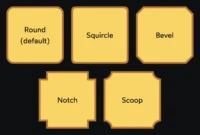
The Chrome 149 beta brings a suite of compelling CSS updates, including CSS gap decorations. This feature will allow developers to directly style the whitespace, or gaps, between flex and grid items, offering finer control over layout spacing and visual aesthetics without resorting to margin hacks.
Further enriching the CSS capabilities, the beta introduces support for path() and shape() alongside rect() and xywh() as basic shape functions within the shape-outside property. This allows for more complex and nuanced text wrapping and element shaping based on defined paths and geometric shapes. Additionally, path-length is introduced as a new CSS property, enabling developers to query or manipulate path lengths, which could have implications for animation and layout calculations.
On the API front, programmatic scroll methods like scrollTo(), scrollBy(), and scrollIntoView() will now return Promises. These Promises will resolve upon the completion of smooth scrolling animations, providing developers with better control and timing for scroll-triggered events. Another significant development is the eligibility of pages with active WebSocket connections for back/forward caching (BFCache). This could dramatically improve the navigation performance for highly interactive web applications that rely on persistent connections, allowing users to navigate back and forth instantaneously without full page reloads.
Firefox 152 Beta: Form Controls and Notifications Evolve
The Firefox 152 beta is set to bring full support for the field-sizing CSS property. This property allows form controls to automatically adjust their size to fit their content, simplifying the creation of responsive and adaptable form elements.
In terms of notification capabilities, the beta introduces actions and maxActions properties to the Notification interface. This enhancement allows for more sophisticated and interactive notifications, enabling developers to present multiple action buttons and control the maximum number of actions displayed, leading to richer user engagement with web-based alerts.
Furthermore, Firefox 152 beta adds options.pseudoElement support to Element.getAnimations(). This improvement provides developers with greater control and insight into animations applied to pseudo-elements, which are often used for decorative or structural purposes in CSS. This will enable more precise control and inspection of animations in complex UI components.
Broader Impact and Implications
The cumulative effect of these May 2026 browser updates is a more capable, performant, and developer-friendly web platform. The standardization of features like the :open pseudo-class, name-only container queries, and container style queries for custom properties signifies a maturing of CSS, offering more declarative and powerful styling capabilities. These advancements reduce reliance on JavaScript for common styling tasks, leading to potentially faster rendering and more maintainable codebases.
The introduction of native lazy loading for video and audio elements directly addresses critical performance concerns, contributing to a faster and more efficient web for all users, especially those on constrained networks. The Document Picture-in-Picture API unlocks entirely new paradigms for web application design, enabling persistent and interactive user experiences that transcend the traditional browser tab. The expanded support for the Web Serial API further blurs the lines between web applications and physical hardware, opening doors for innovative IoT solutions and industrial applications.
As developers integrate these new features, we can anticipate a wave of more sophisticated, responsive, and performant web experiences. The continuous innovation showcased in the stable and beta releases of major browsers underscores the dynamic nature of web development and the ongoing commitment to empowering creators with the tools they need to build the future of the internet. The trend towards declarative styling, improved performance primitives, and richer interactive capabilities sets a strong precedent for the remainder of 2026 and beyond.