Beyond the Notification Fatigue: Why Modern Digital Workflows Need Seamless Integration Over New Tools

The contemporary knowledge worker is routinely promised a technological renaissance, typically heralded by the arrival of yet another standalone software application designed to revolutionize daily productivity. From complex command-line interfaces to rigid chat-based artificial intelligence interactions, the market is continually saturated with shiny, highly publicized tools that demand onboarding, routine navigation, and persistent attention management. However, empirical workplace productivity studies and evolving user experience (UX) research increasingly suggest a contradictory reality: users do not actually want or need more tools to manage within their daily routines. Instead, what modern workflows require is the seamless integration of functional capabilities that align intuitively with established human mental models.
This growing friction between software proliferation and operational efficiency has sparked a major debate within the product design and UX communities. Rather than forcing professionals to jump between endless applications, tabs, and fragmented interfaces, software architects are shifting toward invisible automation and contextual utility. By embedding intelligent features directly where actual work happens—such as native application integrations and system-level file management rules—the technology industry is attempting to solve a fundamental design paradox: how to deliver advanced technological capabilities without increasing cognitive load.
The Proliferation Trap: Why More Tools Equal Less Productivity
To understand the current resistance to software bloat, one must examine the historical trajectory of office automation over the past two decades. Throughout the 2010s, the prevailing product-led growth model encouraged the unbundling of enterprise software. Companies adopted specialized point solutions for virtually every micro-task—project management trackers, dedicated note-taking repositories, isolated communication channels, and specialized cloud storage directories.
While this unbundling allowed niche startups to scale rapidly, it ultimately culminated in a phenomenon known as application fatigue. According to enterprise software utilization reports published by major workforce analytics firms, the average corporate employee now routinely navigates between ten and fifteen distinct applications daily. This constant context-switching introduces severe friction into the workday. Cognitive psychology research indicates that transitioning between disparate software environments incurs a measurable attention residue penalty, draining mental energy and significantly increasing the frequency of human error.

Furthermore, the introduction of generative artificial intelligence over the past three years initially exacerbated this trend. Early enterprise AI adoption frequently manifested as standalone web portals or chat interfaces requiring users to copy information out of their primary working environment, paste it into a separate chat window, and manually transfer the resulting output back into their documents or spreadsheets. Far from streamlining workflows, this back-and-forth interaction model created an entirely new category of digital overhead. Users found themselves acting as manual human APIs, bridging the gap between disconnected systems that fundamentally lacked architectural cohesion.
The Shift Toward Quiet AI and Contextual Design
Recognizing the limitations of chat-first and portal-based applications, UX researchers and software designers are championing a design philosophy commonly referred to as Quiet AI. Unlike the loud, attention-demanding paradigms of early generative AI applications, Quiet AI operates transparently in the background, executing micro-tasks and assisting with repetitive cognitive burdens without demanding explicit navigation or constant supervision.

The operational objective of Quiet AI is to respect existing mental models—the internal psychological frameworks that users rely on to understand how physical and digital objects behave. For decades, office workers have structured their digital lives around familiar metaphors: documents, spreadsheets, slides, and hierarchical file folders. When software respects these foundational paradigms, the learning curve flattens completely.
A prominent example of this paradigm shift is the integration of advanced language models directly inside legacy productivity suites, such as embedding AI assistance natively within Microsoft Excel, PowerPoint, and Word, or comparable enterprise plugins for Google Workspace. Instead of forcing an analyst to open a separate browser tab to query an external model, these integrations allow users to evaluate specific rows, columns, or paragraphs in context. The software assists the user precisely where the data lives, eliminating unnecessary context-switching and drastically reducing task completion times.
System-Level Intelligence: Folder Instructions and Automated Intent

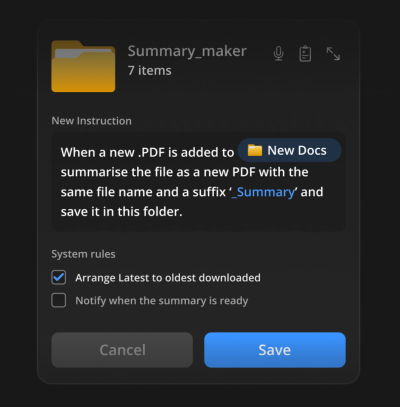
Expanding on the principle of contextual utility, recent design proposals within the UX community have explored how operating systems and file management structures can incorporate intelligent behavior natively. A compelling concept gaining traction among interface designers is the implementation of system-level "folder instructions."
In traditional computing, a folder is a passive container—a digital directory where files are manually deposited, sorted, and retrieved by human hands. However, emerging interface prototypes allow users to assign persistent, natural-language instructions and system rules directly to specific folders based on their intended purpose. For instance, a user creating a directory labeled "Q3 Financial Audits" can establish a background rule instructing the system to automatically parse incoming PDF invoices, extract line-item summaries, flag anomalies, and organize sub-directories according to predefined corporate standards.
This approach transforms the file system from a passive storage bin into an active, automated assistant. Crucially, the permissions and operational scope remain strictly bounded by the physical architecture of the user’s local machine or designated cloud repository. The user defines the intent once, establishes the operational rules, and permits the system to execute repetitive administrative labor autonomously. This localized, intent-driven automation represents the pinnacle of seamless integration: it solves a high-severity, high-frequency frustration point without requiring the user to learn a novel application architecture.
Industry Implications and Future Outlook
The broader business and technological implications of this design pivot are profound. Enterprise software purchasers are increasingly auditing their vendor stacks for consolidation opportunities, favoring platforms that offer deep, native integrations over isolated point solutions. Software vendors that fail to embed their capabilities into existing host environments risk marginalization as mere feature sets rather than indispensable infrastructure.
For product designers, the mandate moving forward is clear. The success of future technology will not be measured by how many novel interaction models it introduces, but rather by how invisibly and efficiently it resolves user friction. Educational initiatives, such as specialized professional training courses focused on AI interface patterns and human-computer interaction guidelines, are heavily emphasizing this transition. Designers are being urged to audit their own product pipelines, asking critical questions about whether a proposed feature genuinely lightens cognitive load or merely adds another layer of digital noise to an already overburdened workforce.

Ultimately, the trajectory of digital productivity points away from feature bloat and toward quiet, contextual harmonization. By respecting established mental models and embedding intelligence directly into the native environments where work naturally occurs, the technology sector can finally deliver on the long-promised goal of reducing operational friction and returning valuable time to the end user.