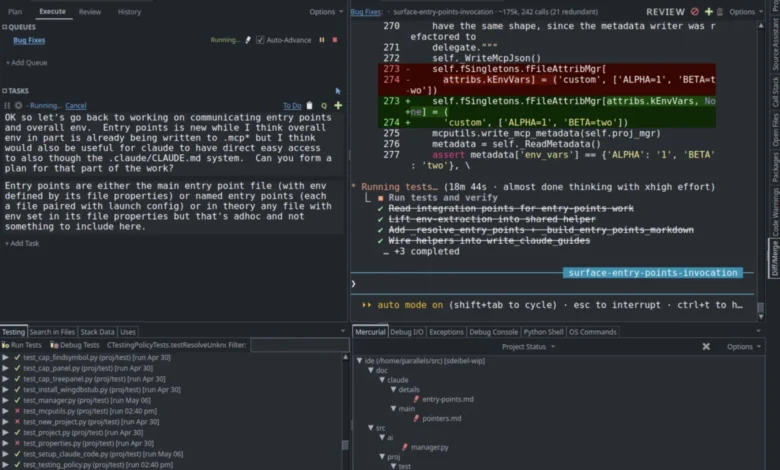
The release of Wing 12 arrives at a critical juncture in the software development industry, where the focus is moving rapidly from basic LLM-powered autocompletion to autonomous agents capable of executing complex multi-step tasks. Wingware’s implementation distinguishes itself by providing the AI agent with direct access to the IDE’s internal state, including its deep source code analysis, unit testing framework, and live debugger.
The Integration of Claude Code and the Model Context Protocol
At the heart of the Wing 12 update is the integration of Claude Code, a high-performance AI coding agent developed by Anthropic. Unlike standard chat interfaces that require developers to manually copy and paste code snippets, the new Claude Code tool in Wing 12 operates as a native component of the IDE. This integration is facilitated by a suite of Model Context Protocol (MCP) servers.
The MCP is an open standard that allows AI models to securely and efficiently access local data and tools. In Wing 12, these servers grant Claude Code a "high-definition" view of the developer’s environment. The agent can navigate the codebase using Wing’s proprietary static analysis engine, understand symbol definitions, find references across the project, and even utilize the debugger to diagnose runtime errors.
According to internal benchmarks released by Wingware, this deep integration makes agent-driven development both faster and more cost-effective. By providing the agent with precise context rather than forcing it to scan the entire project blindly, token usage is minimized, and the accuracy of the agent’s output is significantly improved. Developers can initiate this environment by selecting the "Set Up for Claude Code" option in the Project menu, which automatically configures the active workspace for agentic collaboration.
A Centralized Management System for AI Agents
To address the complexities of supervising an autonomous agent, Wing 12 introduces the Tasks tool. This interface serves as a command center for AI-driven development, allowing users to plan, queue, and execute series of instructions.
One of the primary challenges in adopting AI agents is the "black box" problem, where the agent makes changes to a codebase that the human developer may not fully understand or trust. The Tasks tool solves this by providing a comprehensive auditing and review system. Developers can inspect the agent’s proposed changes, review the logic used to reach a solution, and verify the work before it is committed to version control. This "human-in-the-loop" approach ensures that while the AI handles the heavy lifting, the developer maintains ultimate authority over the code quality and architecture.
Revolutionizing the Debugging and Testing Cycle
Wing 12 introduces a set of AI-driven "FIX" features that transform the most time-consuming aspects of software maintenance: debugging and testing. When a developer encounters a bug during a debug session, they can now hand the current state of the debugger—including local variables, call stacks, and error messages—directly to Claude Code. The agent analyzes the runtime data to identify the root cause and suggests a programmatic fix.
Similarly, the IDE now includes an automated "Write Tests" functionality. Available via the Testing and editor context menus, this feature allows developers to highlight a block of code and prompt the agent to generate corresponding unit tests. This capability is integrated with Wing’s existing test discovery engine, ensuring that new tests are immediately recognized and runnable within the IDE’s test runner.
The "Code Actions" feature further extends this automation. Accessible through a new icon in the editor toolbar, these actions allow for quick, context-aware operations such as explaining complex logic, reviewing code for security vulnerabilities, optimizing performance, and updating docstrings. Importantly, Wing 12 allows these actions to be user-extensible, enabling developers to create custom prompts for repetitive tasks unique to their specific projects or industry standards.
Advanced UI Enhancements and Terminal Emulation
While the AI features take center stage, Wing 12 also includes significant improvements to the IDE’s core functionality and user experience. A major highlight is the implementation of a pseudo-terminal for the OS Commands and Debug I/O tools. This addition provides full ANSI terminal emulation, allowing developers to run and debug programs that rely on sophisticated terminal features, such as cursor positioning, color-coded output, and full-screen Text User Interfaces (TUIs).
The workspace layout has been made more flexible with the ability to drag and drop tools into editor splits. This allows developers to maintain a view of their code while simultaneously monitoring terminal output, test results, or AI agent progress in adjacent panes. To streamline the user experience, the Tools menu has been reorganized into logical groups, and a new search feature has been added to the Preferences dialog to help users quickly navigate the IDE’s extensive configuration options.
Technical Benchmarks and Performance Improvements
Performance remains a priority in the version 12 release. Wingware reports that source code analysis—the engine that powers autocompletion and navigation—has been significantly accelerated. Furthermore, the IDE’s ability to detect externally modified files has been optimized, resulting in faster updates with a lower CPU footprint.
For developers working in distributed environments, Wing 12 improves the handling of VCS operations by intelligently prompting for SSH passphrases and HTTPS credentials when required. The software also adds support for clickable OSC 8 hyperlinks within the terminal tools, enhancing the interactivity of command-line output.
Restructuring the Wing Python IDE Product Line
With the launch of version 12, Wingware has simplified its licensing model, moving away from the distinction between commercial and non-commercial use. The product line is now divided into two feature-based tiers:
- Wing Pro: The flagship version of the IDE, containing all the new agentic development features, Claude Code integration, and advanced debugging tools. This is the recommended version for professional developers who wish to leverage AI to accelerate their workflow.
- Wing Classic: A streamlined version of the IDE designed for developers who prefer a manual development approach without AI agent integration. It retains the powerful core features of Wing but omits the Claude-specific tools.
As part of this restructuring, Wing Personal has been discontinued. Existing users of Wing Personal can continue to use version 11, transition to the free Wing 101 (designed for educational purposes), or upgrade to Wing Classic. Existing commercial and non-commercial licenses for previous versions will be automatically transitioned to Wing Pro.
Chronology and Industry Implications
The journey to Wing 12 reflects the broader evolution of the Python ecosystem. Wing IDE has long been a staple for professional Python developers, known for its deep focus on the language compared to multi-language editors like VS Code.
- Wing 10 & 11: Introduced initial AI features, including the "AI Coder" and "AI Chat" tools, which relied on single-LLM queries.
- The Transition: As the industry moved toward agents, Wingware recognized that a simple chat sidebar was insufficient.
- Wing 12 Release: The current release marks the transition to "Agentic IDE" status, placing Wing in direct competition with emerging AI-native editors while maintaining its legacy of robust Python-specific tooling.
The shift toward agentic development has significant implications for the software engineering labor market. By automating the "boilerplate" aspects of coding—such as writing unit tests and fixing minor syntax warnings—Wing 12 allows senior developers to focus on high-level system architecture and problem-solving. However, it also necessitates a new skill set: agent orchestration. The ability to effectively "prompt" and "audit" an AI agent is becoming as critical as the ability to write the code itself.
Compatibility and Availability
Wing 12 is available for immediate download on Windows, macOS, and Linux. Wingware has ensured that version 12 can be installed alongside older versions without interference. However, developers should note that project files are automatically converted when opened in Wing 12. Because version 12 projects are not backward-compatible, users are encouraged to save copies of their project files under new names during the migration process.
A free 30-day trial of Wing Pro is available for new users, providing full access to the Claude Code integration and the Tasks tool. For educational environments, Wing 101 version 12 remains a free, simplified option for teaching the fundamentals of Python programming without the complexity of professional-grade AI agents.
In conclusion, Wing 12 represents a bold bet on the future of AI-assisted programming. By moving beyond simple code suggestions and giving an AI agent the "eyes and ears" of a full IDE, Wingware is providing Python developers with a powerful new way to manage the complexity of modern software projects. As agentic workflows become the industry standard, Wing 12 positions itself as a premier choice for those seeking a deep, integrated, and professional Python development experience.