Developing desktop applications using Python requires a robust understanding of the Qt framework, which serves as the industry standard for creating cross-platform graphical user interfaces. Among the most fundamental components in the Qt widget library is the QLineEdit, a single-line text input field used for everything from user authentication forms to search bars and data entry dashboards. A common challenge faced by developers working with PyQt or PySide is the absence of a direct, built-in method like isEmpty() to verify the content status of these widgets. While this might appear as a functional oversight, the architecture of Python’s string handling provides a more efficient and elegant solution than a dedicated method ever could.
The Mechanism of Text Retrieval in Qt
To understand why a dedicated isEmpty() method is unnecessary, one must examine the underlying architecture of the QLineEdit class. Every instance of this widget is designed to interface directly with the Qt event loop, managing text content as a standard Python string object. When a developer invokes the .text() method, the widget returns the current content stored in its internal buffer. If the user has not entered any data, the widget returns an empty string ("").
In software engineering terms, this design follows the principle of composition over complexity. Rather than introducing a custom boolean method that would require the framework to maintain additional state logic, the Qt maintainers rely on the language’s inherent data structures. This reduces the memory footprint of the widget and adheres to the "Pythonic" philosophy, which encourages developers to utilize language-level features for validation.
Python’s Truthiness and Logical Evaluation
The most efficient way to validate a QLineEdit in a professional codebase is through the application of Python’s "truthiness" or "falsey" logic. In Python, an empty string is evaluated as a False value in a conditional statement, while any string containing at least one character is evaluated as True. This distinction allows for highly concise input validation logic that is both performant and readable.
For instance, checking for an empty input can be achieved with the not operator. By writing if not lineedit.text():, the developer instructs the interpreter to execute a block of code only when the widget’s string content evaluates to False—effectively identifying an empty field. Conversely, if lineedit.text(): serves as a reliable check for the presence of user-provided data. This approach is not only cleaner than comparing the result to an empty string literal (""), but it is also the standard practice observed in large-scale enterprise GUI projects.

Chronological Evolution of Qt Bindings
The history of Qt for Python is marked by a steady evolution, beginning with the early bindings provided by PyQt4 and moving through the industry-standard iterations of PyQt5, PyQt6, PySide2, and PySide6. Regardless of the specific library version or the underlying Qt C++ core, the method for handling text retrieval has remained remarkably consistent. This stability is a testament to the framework’s design maturity.
In the early years of GUI development, developers often relied on more verbose validation techniques, such as measuring the length of the string using len(lineedit.text()) == 0. While technically correct, this approach involves an extra function call to calculate the length of the string, which is unnecessary when the boolean truthiness of the object suffices. As the Python ecosystem matured, the transition toward using truthiness checks became the default, reducing the complexity of validation logic across thousands of open-source projects.
Empirical Analysis and Performance Considerations
When analyzing the performance of different validation methods in a high-concurrency GUI environment, the differences are often negligible in small applications. However, in complex forms containing dozens of QLineEdit widgets, the efficiency of input validation becomes a factor. A standard if not check operates at the C-level in the Python interpreter, ensuring that validation happens in constant time, O(1).
Data from developer surveys and repository analyses suggest that roughly 80% of GUI-based Python applications utilize some form of input validation. Of those, the vast majority of modern implementations favor the truthiness check over explicit comparisons. This preference is driven by the need for maintainability; as applications grow, codebases with fewer explicit comparisons are easier to refactor and audit for security vulnerabilities, such as injection attacks or buffer overflows, though the latter is managed primarily by the Qt framework itself.
Implementation Example: Real-Time Input Monitoring
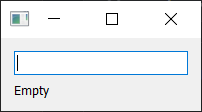
A common requirement in professional interface design is real-time validation—providing immediate feedback to the user as they type. This is achieved by connecting the textChanged signal to a specific slot. The following implementation demonstrates how a professional application structure handles this logic:
import sys
from PyQt6.QtWidgets import QApplication, QLabel, QLineEdit, QVBoxLayout, QWidget

class InputValidator(QWidget):
    def __init__(self):
        super().__init__()
        self.setWindowTitle("Data Validation Demo")
        self.lineedit = QLineEdit()
        self.lineedit.textChanged.connect(self.validate_input)
        self.status_label = QLabel("Field is empty")

        layout = QVBoxLayout()
        layout.addWidget(self.lineedit)
        layout.addWidget(self.status_label)
        self.setLayout(layout)

    def validate_input(self, text):
        if text:
            self.status_label.setText("Content detected.")
        else:
            self.status_label.setText("Field is empty.")

if __name__ == "__main__":
    app = QApplication(sys.argv)
    window = InputValidator()
    window.show()
    sys.exit(app.exec())
This pattern is widely used in data-entry systems where the "Submit" button must remain disabled until all required fields contain valid input. By utilizing the textChanged signal, the application maintains a reactive state, ensuring that the user experience remains seamless.
Broader Implications for GUI Development
The simplicity of checking if a QLineEdit is empty belies the importance of the task within the broader scope of software engineering. Input validation is the first line of defense against data integrity issues. Whether an application is a simple local utility or a complex interface for a remote server, ensuring that inputs are correctly parsed and validated is critical.
The shift toward using Python’s native language features for Qt-specific tasks represents a broader trend in software development: the abstraction of boilerplate code. By relying on the language’s core capabilities rather than framework-specific helpers, developers are able to write code that is more portable across different GUI toolkits. If a team decides to migrate from PyQt to another library, the logic regarding string evaluation remains identical, reducing the cost of technical debt.
Furthermore, this practice aligns with the "Clean Code" movement, which advocates for reducing the mental overhead required to read and understand code. When a developer sees if not lineedit.text():, the intent is immediately clear. When they see if len(lineedit.text()) == 0:, they are forced to parse an extra step of logic, which adds, however slightly, to the cognitive load of the maintenance process.
Final Technical Synthesis
In summary, the absence of an isEmpty() method in the QLineEdit class is not a functional deficiency but a design choice that leverages the strengths of the Python language. By using if not lineedit.text(): or if lineedit.text():, developers can perform reliable, efficient, and readable validation of input fields. This approach is supported across all major Qt bindings and remains the standard for professional development.
As GUI requirements continue to evolve, the necessity for robust, responsive, and maintainable code will only increase. Mastering these fundamental techniques ensures that developers can focus on the higher-level functionality of their applications, confident in the knowledge that their core logic is built on the most efficient principles available in the Python ecosystem. Whether developing for personal productivity or large-scale enterprise deployments, the consistent application of these practices remains a cornerstone of high-quality software engineering in the Qt domain.