The Ultimate Practical Guide to Naming UI Components, Design Tokens, and Digital Products

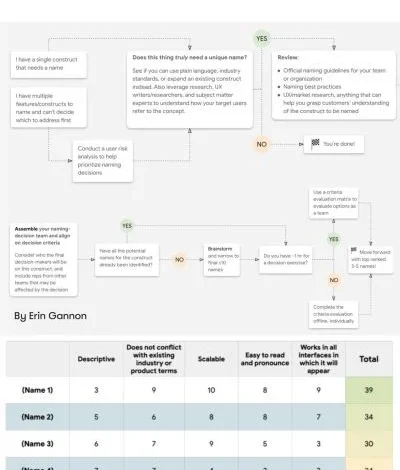
The perennial adage in software development and digital design asserts that there are only two hard things in computer science: cache invalidation and naming things. Across the technology sector, miscommunications frequently arise not from flawed algorithms or poor visual aesthetics, but from a fundamental lack of a shared vocabulary. The language utilized by digital creators profoundly shapes both cognitive frameworks and interpersonal team dynamics. This semantic friction generates pervasive confusion surrounding colors, iconography, user interface components, and systemic features, ultimately rippling down into poorly defined design tokens, erratic HTML classes, and ambiguous code variables.
When establishing nomenclature for digital artifacts, practitioners routinely oscillate between two problematic extremes. Names can be overly generic, obscuring the precise intent and functionality of the element, or conversely, overly specific, severely restricting future flexibility, scalability, and component reuse. Resolving this tension requires a systematic approach to taxonomy, drawing from established industry frameworks, cross-discipline word repositories, and comprehensive design system case studies.

The Genesis of Semantic Confusion in Digital Product Development
Historically, the evolution of digital product design has fractured communication into distinct tribal dialects. Product managers speak the language of business metrics and user stories; designers converse in visual hierarchy, spacing values, and spatial layouts; and developers operate within the strict boundaries of component trees, state management, and semantic markup. When these groups attempt to collaborate without a unified lexicon, friction is inevitable.
A prime example of this breakdown occurs when a feature suffers from chronically low adoption rates. Industry analysts frequently attribute this phenomenon to complex user journeys or insufficient onboarding. However, qualitative user research often reveals a simpler culprit: poor discoverability driven by confusing feature names. Feature adoption is a sequential cognitive pipeline that requires a user to discover, understand, try, learn, and finally integrate a capability into their existing daily workflow. If the terminology assigned to a feature fails to reflect the user’s mental model or the job-to-be-done, the entire adoption funnel collapses. Consequently, effective nomenclature must be rooted directly in the end-user’s vocabulary, gathered by prompting users to describe functionalities in their own words rather than relying on internal corporate jargon.

Expanding Horizons: Creative Resources for Code and Class Naming
To break free from monotonous or confusing naming patterns for HTML classes, CSS properties, and JavaScript functions, developers increasingly turn to cross-disciplinary inspiration. Tools such as Paul Robert Lloyd’s Classnames resource provide thematically grouped lists of words designed to stimulate out-of-the-box thinking. Moving far beyond traditional technical descriptors, these curated collections incorporate terminology drawn from nature, art, theater, music, architecture, fashion, and publishing. By leveraging these diverse semantic domains, engineering teams can describe behavior, grouping, order, and association with greater nuance and reduced naming collisions.
Similarly, addressing the challenge of color nomenclature has led to massive collaborative datasets. Maintaining an intuitive color palette across a multi-platform product is notoriously difficult. To mitigate this, open-source initiatives like David Aerne’s color-names repository aggregate tens of thousands of unique color names sourced from diverse historical references and thousands of individual community contributions. Supplemented by interactive color pickers and search utilities, these repositories give engineering and design teams standardized, human-readable references for complex hex values, bridging the gap between raw data and memorable semantics.

Structuring Layers, Groups, and Component Taxonomies
Within visual design environments such as Figma, Sketch, and Adobe XD, the lack of structured layer and group naming can quickly transform a design file into an unmanageable labyrinth. Design systems expert Javier Cuello has formalized a rigorous set of naming best practices aimed at establishing consistency and scalability across design assets.
According to Cuello’s guidelines, an effective layer or component name must possess a logical structure, remain concise yet meaningful, be universally understood across multidisciplinary teams, and avoid relying purely on transient visual properties like positioning or immediate color shades. Adhering to strict do’s and don’ts enables teams to maintain clean design files that seamlessly translate into codebases, minimizing translation errors during developer handoffs.

At the systemic level, enterprise design systems require even more sophisticated taxonomies. A notable case study in this domain is the multi-brand design token architecture developed by the engineering and design teams at Intuit. Serving massive consumer-facing products such as Mailchimp, QuickBooks, TurboTax, and Mint, the organization required a flexible token taxonomy that transcended individual brand themes to serve as a foundational infrastructure across varied product ecosystems. By categorizing tokens from foundational primitives to contextual semantics, Intuit established a resilient model that other enterprise organizations now emulate.
Standardizing UI Components Through Cross-Industry Inventories
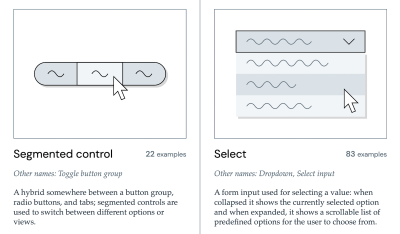
When initiating a new design system or refactoring an existing codebase, determining the standard nomenclature for ubiquitous interface elements can consume disproportionate amounts of time. Rather than reinventing the wheel or falling down endless design system rabbit holes, practitioners can leverage aggregated industry research. Iain Bean’s Component Gallery serves as a definitive catalog, collecting real-world examples and variant names for more than 50 distinct UI components—ranging from standard accordions to complex data tables.

Complementary visual dictionaries, such as Name That UI, provide rapid reference points that align terminology between designers and developers. By examining how mature design systems label common patterns, teams can eliminate internal debates and adopt battle-tested naming conventions that resonate with modern user expectations.
Advanced Token Architectures: The Vodafone UK Variables Taxonomy Map
As digital products evolve to support multi-brand, multi-themed, and multi-mode environments (such as dark and light themes), the complexity of design token management increases exponentially. A benchmark for modern token architecture is demonstrated by the Vodafone UK Design System team through their published Variables Taxonomy Map.
Building upon foundational work by design systems pioneer Nathan Curtis, Vodafone’s mapping framework delineates the precise anatomy and categorization of design tokens across four interconnected collections: brand primitives, semantic roles, component-specific styles, and page-level applications. This structured approach ensures that any team member can instantly determine where a specific token is utilized, what theme it belongs to, and what value it represents purely by reading its programmatic name.
To further assist practitioners in implementing these structures, resources such as Romina Kavcic’s Design Token Naming Guide and associated spreadsheet inventories provide interactive builders and bird’s-eye verification matrices. These tools allow teams to configure custom naming hierarchies encompassing components, categories, states, and roles while easily accommodating future scaling demands without losing track of dependencies.
Broader Implications and Strategic Recommendations

The overarching implication of these developments is clear: establishing a cohesive, organization-wide naming strategy is not a superficial administrative task, but a critical driver of operational efficiency and product quality. Disjointed naming conventions directly correlate with increased technical debt, extended onboarding times for new team members, and diminished cross-functional collaboration.
To mitigate these risks, product organizations should implement the following strategic steps:
- Audit Existing Taxonomies: Conduct a comprehensive review across codebases, design files, and product features to identify persistent naming conflicts and dialect discrepancies between engineering, design, and product management.
- Establish Shared Glossaries: Adopt external reference repositories and internal dictionaries to standardize the naming of UI components, color tokens, and feature sets.
- Prioritize User-Centric Feature Naming: Ground feature and capability names in the language of the end-user, prioritizing the conveyed value and job-to-be-done over internal corporate terminology.
- Treat Naming as an Iterative Process: Acknowledge that as products scale, initial naming structures may require refinement. Maintain a dedicated backlog for addressing naming technical debt to continually reduce cognitive load and friction across teams.
By treating nomenclature as a first-class citizen in the product development lifecycle, organizations can eliminate costly miscommunications, accelerate feature adoption, and foster a more harmonious, collaborative engineering and design culture.
Related posts: