JupyterLab Workshop Extension Transforms Interactive Education and Software Onboarding

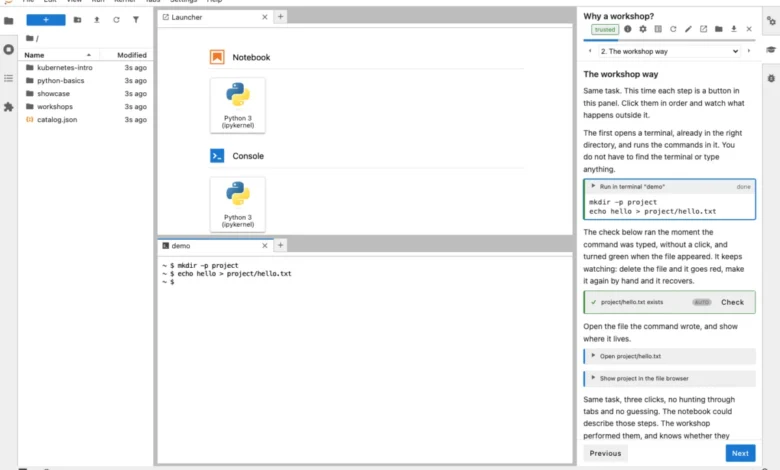
The release of the jupyterlab-workshop extension marks a significant evolution in how educational content and software documentation are delivered within the Jupyter ecosystem. Developed by Graham Dumpleton, this open-source tool introduces a persistent sidebar panel that separates instructional guidance from the active work environment. By allowing users to execute commands, edit files, and run code directly within the JupyterLab interface through interactive "clickable actions," the extension addresses long-standing limitations inherent in traditional notebook-based teaching. The project, now available on PyPI and documented on ReadTheDocs, aims to provide a more robust, hands-on alternative to passive walkthroughs.
The Limitations of Traditional Notebooks
For years, the Jupyter Notebook has served as the de facto standard for technical instruction. While effective for data exploration, its utility for teaching software engineering, command-line tools, or infrastructure-heavy tasks has been constrained by its structural design. Traditional notebooks operate as a linear stream of code cells and Markdown, which often leads to a "passive" learning experience. Users frequently navigate through these documents by executing cells in sequence without fully engaging with the underlying system.
This design introduces three primary pedagogical hurdles. First, the lack of real-world environmental context means that learners often observe the notebook performing the task rather than performing it themselves. Second, the single-language, single-environment constraint of a notebook makes it impossible to teach complex workflows—such as configuring virtual environments, managing Git repositories, or interacting with system-level shell commands—directly within the educational medium. Third, the intermingling of instructions and code creates a cluttered workspace, making it difficult for instructors to verify whether a student has successfully completed a step, or if they have skipped critical processes, leading to cascading failures in later stages of the curriculum.
A New Architecture for Interactive Learning
The jupyterlab-workshop extension addresses these challenges by decoupling the instructions from the execution environment. The extension operates as a dedicated sidebar tab, offering a structured, paginated interface. Each page features a progress bar, navigation controls, and actionable elements that trigger real-world operations in the adjacent JupyterLab terminal or editor.
When a learner clicks an action, the extension executes the corresponding command in a live environment, such as a shell command or a file-writing operation. Crucially, these actions are not simulations. Because they operate in a genuine JupyterLab session, users retain the ability to manually inspect, modify, or troubleshoot the environment. This transparency is bolstered by a built-in verification engine. Instructors can embed verify blocks that monitor the system state—such as checking for the existence of a specific file or verifying the output of a terminal command—providing immediate feedback to the learner.
The underlying architecture is built for simplicity and portability. A workshop is organized as a directory containing a workshop.yaml manifest, a collection of MyST Markdown files, and a supplementary files directory. This plain-text structure ensures that the entire workshop is compatible with version control systems like Git. Furthermore, the extension includes a security framework that allows learners to manage capabilities; before any workshop executes, the user must grant permission for specific actions, such as terminal access or file modification, ensuring that educational content remains secure.
Chronology and Development Context
The development of this extension follows years of experience with Educates, a platform designed for complex, Kubernetes-based workshop delivery. While Educates remains a premier tool for enterprise environments requiring multi-container orchestration, its dependency on Kubernetes has limited its accessibility for individual developers and small-scale open-source projects.
The decision to build jupyterlab-workshop was, in part, a response to the need for a lightweight, infrastructure-agnostic solution. In early September 2026, the author released a series of 24 "wrapture" workshops to demonstrate the viability of this new extension. The project’s timeline saw a rapid transition from a conceptual solution to a fully functional tool, accelerated by the use of AI-assisted coding practices. By shifting the focus from server-side infrastructure to client-side JupyterLab integration, the project has effectively democratized the ability to create high-quality, interactive tutorials.
Technical Deployment and Accessibility
A primary objective of the project is to ensure that workshops run wherever JupyterLab is supported. Developers can integrate the extension into a virtual environment using standard package managers like uv or pip. For those who prefer a zero-configuration experience, the tool supports a jupyter-workshop launch command, which automatically detects and initializes available workshops.
The extension is highly adaptable regarding hosting:
- Binder: Enables free, ephemeral, browser-based sessions, making it ideal for open-source project documentation.
- GitHub Codespaces: Provides a persistent, personal environment where learners can complete complex workflows across multiple sessions.
- JupyterLite: Allows for a fully browser-based experience by compiling JupyterLab into WebAssembly, enabling workshop delivery via static site hosting on platforms like GitHub Pages.
This flexibility represents a paradigm shift for software maintainers. Instead of maintaining dedicated training infrastructure, developers can now provide "guided installs" or interactive tutorials that live alongside their source code.
Broader Implications for Technical Education
The implications of this technology extend beyond standard workshops. By embedding interactive guides into the development environment, software teams can create self-documenting setup wizards that verify system prerequisites, such as the correct installation of compilers or libraries, in real-time. This reduces the "time-to-first-success" for new contributors, a metric often cited as a critical bottleneck in the open-source community.
However, the integration of AI in the development of this tool has sparked discussion within the technical community. The author notes that the extension, and indeed the content within the workshops, was largely produced through AI-assisted workflows. While some practitioners express reservations about AI-generated software, the practical results—evidenced by the 24 functional wrapture workshops—demonstrate a significant increase in the speed and efficiency of producing technical content.
As the industry moves toward increasingly automated documentation, the jupyterlab-workshop extension serves as a bridge between static text and fully automated, verified learning environments. By prioritizing user agency, system transparency, and low barriers to entry, the tool addresses the systemic issues that have historically hampered the adoption of sophisticated training platforms.
For developers and educators looking to implement this system, the project’s documentation, including the "getting started" guide and a showcase collection of demonstrative workshops, provides a clear roadmap. As the project matures, future updates are expected to address advanced deployment scenarios, further cementing its role as a versatile asset in the technical documentation landscape. Whether used for onboarding new engineers or teaching complex data science workflows, the extension offers a scalable, sustainable approach to interactive technical education.