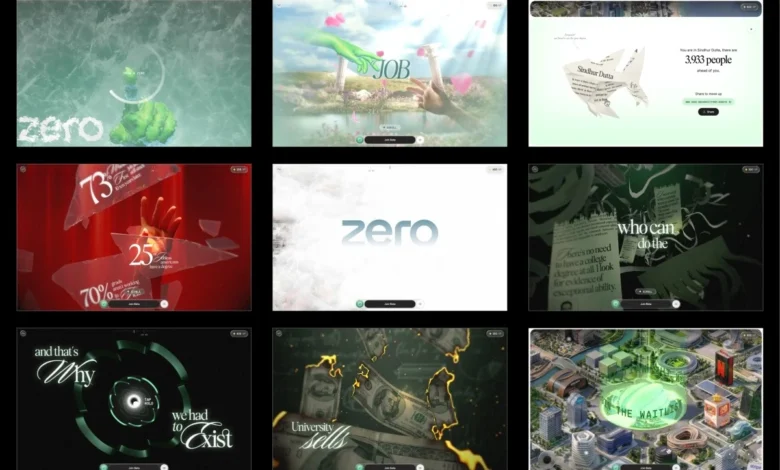
The digital landscape is constantly evolving, pushing the boundaries of what’s possible in online experiences. A recent project, dubbed "ZERO," has emerged as a compelling case study in innovative web development, showcasing a meticulously crafted interactive narrative that prioritizes both artistic vision and technical prowess. This immersive experience, designed to challenge traditional educational pathways, eschews conventional website entry points in favor of a unique user interaction that sets the stage for a captivating journey.
Upon arrival at the ZERO website, visitors are greeted not with a typical "enter" button, but with a prompt to draw a zero. This seemingly simple gesture triggers a cascade of visual effects, beginning with a frost that spreads from the drawn stroke, gradually revealing the immersive experience that lies beyond. This novel interaction serves as an immediate hook, capturing user attention within seconds and providing a sense of immediate reward for engagement. The underlying mechanism for this gesture recognition is remarkably straightforward, analyzing three key metrics: the total signed angle of the stroke, its roundness, and its degree of closure. Should the drawing meet these criteria, its centroid becomes the catalyst for a frost shader, initiating the unfolding narrative.
The development of ZERO was a four-month endeavor, leveraging a robust tech stack including Three.js for 3D rendering, GSAP for animation, Howler for audio, and Vite for efficient build processes. A significant technical achievement lies in the project’s ability to compress over a gigabyte of source assets into a web experience under 10 megabytes, all while maintaining a smooth 60 frames per second performance, even on less powerful mobile devices. This feat of optimization underscores a deep understanding of web graphics pipelines, tooling, shaders, and performance tuning.
Genesis of the Project: A Proof of Concept Wins the Day
The genesis of ZERO can be traced back to a bold pitch strategy. Instead of a traditional presentation, Atul Khola’s team opted for a working prototype, a proof of concept that immediately demonstrated the project’s potential. The core concept—an immersive scrolling narrative designed to question the value of traditional degree paths—was strong from inception. The critical "draw a zero" interaction was developed within a mere 48 hours, showcasing the team’s agility and commitment. Artificial intelligence played a pivotal role in accelerating the initial development, allowing the team to quickly iterate on the frost effect until it achieved the desired aesthetic and feel. This successful proof of concept was instrumental in securing the project.
The integration of AI into the development workflow marked a significant shift. Rather than dedicating extensive time to building initial versions of ideas, the team could leverage AI to generate these rapidly. This allowed them to pivot their focus towards critical aspects like testing, refinement, and iteration. Multiple variations of effects, such as burning money and glass shattering, were explored, alongside various shader concepts, before settling on the optimal implementation. The initial coding phase became less about creation and more about evaluation, enhancing details, and ensuring that every interaction felt precise and impactful.

A Narrative Unfolding: Six Stages, Five Gates
The ZERO experience is structured across six distinct scrolling stages, intricately linked by five interactive "gates." These gates act as pauses or redirects in the narrative flow, demanding user interaction to progress. Examples include the initial "draw a zero" challenge, a "hold to shatter glass" sequence, and a "hold to launch through a tunnel" segment.
The narrative arc is designed to be both compelling and thought-provoking. It commences by presenting the conventional promise of higher education: diligent study leading to academic success and ultimately, employment at a prestigious company. The first interactive gate, however, shatters this illusion. As the user breaks through the virtual glass, they are confronted with stark unemployment statistics scattered across the fragments. The third stage further deconstructs the perceived value of a degree, with imagery of burning money and shredded certificates, transitioning into a tunnel shaped like the ZERO logo. Emerging from this symbolic passage, the experience shifts to stage four, revealing a cityscape constructed from the headquarters of prominent corporations, positioned above a bed of clouds. The penultimate stage, stage five, cedes control to the user, presenting an interactive city map that invites free exploration.
Architectural Foundation: A Single Scroll Drives the Experience
A fundamental architectural decision in ZERO was the complete abandonment of the browser’s native scrolling functionality. This meant foregoing elements like ScrollTrigger and oversized DOM structures. Instead, the experience relies on a virtual scroll value, meticulously updated by wheel and touch inputs, which then eases towards its designated target. This single value acts as the central nervous system, dictating everything from asset loading and animation sequences to shader timing, text rendering, and overlay displays.
Each stage and interactive element within ZERO is encapsulated as a self-contained segment, complete with its own optional lifecycle. These segments are defined by parameters such as scrollVh (determining the virtual scroll distance they occupy) and lifecycle methods like enter, scrub, update, and teardown. This modular approach significantly enhances code maintainability, particularly in the later stages of development, and simplifies the debugging process. By design, jumping to any stage triggers the re-execution of the lifecycle for all preceding segments, ensuring a consistent and initialized experience, as if the user had naturally scrolled through the entire narrative. In practice, the project is divided into nine such segments, with the initial loading screen also serving as the first interactive gate.
Preparing 3D Assets for the Web: A Masterclass in Optimization
A substantial portion of the four-month development timeline was dedicated to the intricate process of preparing the 3D assets for web deployment. The original source files, originating from production Blender scenes, were characterized by uncompressed geometry, 8K textures, and baked animations, accumulating to over a gigabyte of data. The initial phase involved a rigorous evaluation to determine the most suitable format for each asset.
Geometry is delivered using DRACO compression, with self-hosted decoders integrated directly into the project. The Draco and KTX2/Basis transcoders are bundled within the public/vendor/ directory, a deliberate choice to avoid reliance on external CDNs. This decision was reinforced by a past experience where slowdowns on common CDN providers like gstatic and unpkg caused compressed assets to fail decoding, despite being locally hosted. This underscored the critical principle: if your decoder resides on another server, your entire asset pipeline becomes vulnerable to external dependencies.

Textures presented the most significant performance bottleneck. While PNG files might appear small on disk, they are fully decompressed into GPU memory. A single 2048×2048 texture, regardless of its file size, can consume approximately 16MB of VRAM. KTX2, employing ETC1S compression, offers a substantial advantage by remaining compressed on the GPU, drastically reducing memory usage and accelerating upload times.
The Compression Previewer: A Bespoke Tool for Fine-Tuning
The nature of KTX2 compression, particularly ETC1S being a lossy format, presented a challenge for local previewing and optimization. Achieving the right balance between file size and visual quality often devolved into a time-consuming trial-and-error process, where a single global setting could either waste memory or introduce noticeable degradation to textures requiring higher fidelity.
To address this, the development team integrated a custom converter and previewer into their internal dashboard. This tool facilitates side-by-side comparisons of compressed and uncompressed images and videos, enabling precise adjustments to ETC1S settings on an asset-by-asset basis. This granular control allowed for more aggressive compression where it was imperceptible, while preserving critical quality for primary assets, and selectively disabling mipmaps where they were not essential. This seemingly simple tool proved instrumental in optimizing the final build, highlighting a often-overlooked aspect of WebGL workflows.
The strategy of consolidating related textures into shared atlases was applied extensively. For instance, all hand textures were meticulously packed into a single 4×4 atlas. Each mesh then utilizes UV offsets and scaling to reference its specific section within this consolidated texture. This same approach extended to other elements, with text sprites being consolidated from four separate atlases into one, followed by certificates, paper shreds, clouds, coins, and glass shards. Over fifty individual images were streamlined into approximately a dozen atlases, while many gradient backgrounds were replaced with concise GLSL code. Initial builds hovered around 35 to 40MB; the final iteration, however, clocks in at under 10MB, with the interactive world map strategically isolated in its own loading group to ensure it never obstructs the initial loading experience.
Mitigating Performance Hitch: Strategic Texture Uploads
Optimizing download size is only one facet of performance. Compressed textures still require uploading to the GPU on the main thread, and large textures can easily introduce frame drops by blocking rendering for up to 50 milliseconds. If such an upload occurs precisely when a texture is needed during scrolling, the resulting hitch becomes acutely noticeable, diminishing the perceived fluidity of the site.
To circumvent this issue, texture uploads were managed through a three-pronged approach:

- Idle Time Uploads: Leveraging
requestIdleCallback, the system schedules texture uploads during periods of browser idleness. This ensures that less critical assets are uploaded without impacting the rendering pipeline. - Synchronous Flushing Before Critical Moments: At specific junctures, such as when a new stage is about to render or during gate transitions, the upload queue is flushed synchronously. This guarantees that all necessary textures are already present on the GPU before they are required on screen, thereby preventing first-time upload stutters during active scrolling.
- Pre-warming Textures: Key textures, particularly those associated with effects that are initialized lazily, are pre-warmed during idle time in earlier stages. This ensures that their first render is a cache hit, avoiding shader compilation stalls that can occur on initial use.
Adaptive Quality Management: Tailoring Visuals to Performance
Recognizing the inherent unpredictability of user devices, the renderer continuously monitors its own performance. Frame times are tracked using a rolling buffer, allowing for dynamic adjustments to visual quality. If rendering performance dips below acceptable thresholds, the system automatically steps down to a lower quality tier. Conversely, if performance improves and remains stable, it scales back up. A built-in cooldown mechanism prevents rapid, jarring switches between quality levels.
These quality tiers do not compromise the core experience. Instead, they fine-tune visual embellishments such as pixel ratio, blur samples, geometric complexity of elements like coins, and text resolution. This ensures that the narrative remains consistent across both high-end flagship devices and more budget-oriented phones. Targeted optimizations are also employed. For instance, during the glass shattering interaction, the renderer temporarily reduces the pixel ratio and disables blur and frost effects, effectively masking any performance cost within the interactive gesture itself. A significant portion of the final development month was dedicated to profiling and optimizing performance on a budget Android device, systematically addressing frame spikes until a smooth experience was achieved. One particularly stubborn offender was identified as a single 157ms frame, which required meticulous investigation to resolve.
The Art of Shaders: Crafting Visual Narratives
The visual richness of ZERO is heavily indebted to its sophisticated shader implementation. Each frame is constructed through a series of post-processing passes applied sequentially, including the core 3D scene render, a procedural background generation, the frost effect for the "draw a zero" interaction, depth-of-field effects (gated by quality tiers), and a final pass for grain and tone mapping. Additional passes for specific effects like text rendering, glass shattering, and frost melting are initialized lazily and warmed up during idle periods to avoid impacting the loader’s critical path.
Frost Unlock: A Crystalline Transformation
The signature frost effect is achieved through a ping-pong buffer system employing four passes: horizontal, vertical, and two diagonal passes. Each pass iteratively expands the drawn stroke by propagating the brightest neighboring pixels, resulting in an octagonal growth pattern. This expansion is modulated by the luminosity of a frost texture, imbuing the edges with a natural, crystalline appearance. Once the stroke is complete, its centroid serves as the origin for a radial melt effect. The shader logic for the frost expansion involves propagating brightness through a series of steps, modulated by the texture’s luma values, creating the characteristic icy spread.
Lighting Hands Without Lights: Baked Illumination for Skinned Meshes
Achieving real-time lighting on skinned meshes would have been computationally prohibitive. Furthermore, the lighting needed to precisely match the original artwork. The solution involved baking lighting information directly into textures and employing a blending technique. Two texture slots are utilized, with the incoming slot updated at each keyframe and smoothly cross-faded to create seamless lighting transitions. The blending process involves premultiplying the alpha channel before blending to prevent dark halos around the transparent edges of the hand elements. Both lighting textures are stored as regions within a single atlas, meaning that switching between them only requires updating two UV offsets and a blend factor.
Burning Money: Dissolving Assets with Precision
The visually striking burning money effect is driven by a noise-based distance field that gradually dissolves each banknote over time. Just before the burn front reaches a particular area, a thin, glowing HDR ember rim appears, followed by the appearance of the charred surface. The shader logic here involves a threshold that sweeps across the burn progress, calculating the distance to the burn front and then generating an edge value. Fragments are discarded early if they haven’t reached the burn threshold, optimizing performance. The most computationally intensive part of this shader is the Fractal Brownian Motion (FBM) function, making early discarding crucial.

Shredding Certificates: Deconstructing with Analytical Normals
In the certificate shredding effect, each vertex is assigned a strip index that dictates its belonging to a specific shred. As the shred front progresses from left to right, each strip detaches from the main sheet and falls independently, complete with its own rotation, creating the illusion of the certificate tearing into individual ribbons. The lighting normals are generated analytically from the same wave function that drives the animation, eliminating the need for a separate normal map. The animation of the strips involves applying gravity and independent tumbling, with the ease-in effect controlled by the shred progress.
The Tunnel Effect: A Seamless Visual Journey
The tunnel sequence is generated by extruding the cross-section of the ZERO logo. A brightness pulse travels through the tunnel, utilizing the geometry’s world-space Z-coordinate. This approach ensures the effect remains seamless, even as sections of the tunnel repeat. The shader calculates a fractional value based on the world-space Z-coordinate and pulse frequency, creating a pulsating band of light that moves through the tunnel.
Text Rendering: Gradual Focus with Hexagonal Blur
The narrative text is rendered using a seven-tap hexagonal blur, comprising a central sample and six surrounding samples. The blur radius is dynamically controlled by the reveal progress, allowing the text to gradually sharpen into focus rather than appearing instantaneously. This effect is integrated into the deferred text pass, meaning the blur is completely bypassed when no text is visible, thus avoiding any unnecessary rendering overhead. A critical debugging insight during development was the importance of shader precision. Several shaders required explicit setting to highp float because many mobile GPUs, including Adreno and Mali, interpret mediump as a true 16-bit float. This distinction led to bugs that were absent on desktop, such as synchronized movement of certificate strips or visible banding in the burn effect, reinforcing the necessity of early and consistent testing on real mobile devices.
Interaction Design: Crafting Engaging User Gates
The source material for ZERO primarily consisted of images and videos, necessitating the design of interaction specifications from the ground up. The majority of the interactive gates employ a configurable press-and-hold system. A shared configuration defines the timing of prompts and the duration of the hold, while each gate customizes its visual feedback through a set of specific hooks.
During the hold interaction for the glass shattering, the entire frame gradually shifts towards a dark red hue. Upon shattering, the color snaps back within approximately 200 milliseconds, creating a visceral sense of the shards breaking away the darkness. A longer transition of 400 milliseconds was found to be noticeably less impactful. The synchronization of the shatter sound effect with the first rendered frame, rather than a timer, was another key interaction design choice. This ensures that on slower devices, the audio plays concurrently with the visual animation, preventing a perceived desynchronization.
The Grand Finale: An Interactive World
The concluding launch sequence transports the user into an open sky. As stage four progresses, the clouds recede, unveiling the cityscape below, with the ZERO tower prominently positioned at its center. A luminous halo appears above the tower, marking the final gate before the camera settles into the interactive map.

Stage five transitions control entirely to the user. Visitors can pan, zoom, and explore the city at their leisure. Each marker on the map opens a card detailing the role, scenario, and associated tools, along with a prominent "Join Beta" button. A persistent join bar also serves as the waitlist signup mechanism. After guiding the user through the narrative, the experience concludes by empowering them to explore its offerings independently.
Concluding Reflections: Lessons Learned
The ZERO project offered several significant takeaways for the development team. Foremost among them is the critical importance of asset preparation and GPU uploads, which demand as much attention as the rendering process itself. Tools such as the compression previewer, self-hosted decoders, the upload queue, and the adaptive quality manager, while perhaps not the most glamorous aspects of the pipeline, were instrumental in transforming over a gigabyte of source assets into a sub-10MB experience that performs smoothly on budget mobile phones.
Regarding the role of AI, it proved invaluable in its capacity to accelerate the initial development phases. It effectively generated the first iteration of much of the codebase, including the pivotal prototype that secured the project. However, the subsequent stages—refining interactions, enhancing visuals, optimizing performance, and making countless nuanced decisions based on real-device testing—remained firmly rooted in human expertise. While AI can rapidly generate code, the creation of a polished, interactive experience continues to rely on meticulous iteration and astute engineering judgment.
Credits
The realization of the ZERO project involved a dedicated team of individuals, each contributing their expertise:
- Project Lead: Atul Khola
- 3D Art & Design: [Names of 3D artists and designers]
- Front-end Development: [Names of front-end developers]
- Shader Development: [Names of shader developers]
- Interaction Design: [Names of interaction designers]
- Audio Design: [Names of audio designers]
- AI Integration: [Names of individuals involved in AI implementation]